0
End-to-End Steps
From intake planning to retrospectives
0%
Workflow Transparency
Real-time status across every team member
0
Core Functional Views
Kanban, Gantt, List, Calendar & Analytics
0s
Instant Auto-Save
Zero drag delay with live cloud sync
Main Motive

Why the Work Module exists

Give a team one central place to create, assign, execute, monitor and complete work. The updated design focuses on richer interaction, better visibility, automation and clearer data.

📋

Create & Organize

Structure work with categories, priority, deadlines, story points and parent tasks.

👤

Assign & Own

Assign work to the right team member and track ownership with clear visibility.

📊

Track Progress

Monitor status, priority, deadline and progress with timers and progress bars.

📅

Plan Timelines

Use Gantt and Calendar views for dependencies, due dates and critical path.

📈

Analytics

Monitor performance through interactive charts, completion rates and SLA compliance.

⚡

Automate

No-code If-Then rules for notifications, re-assignment and status changes.

🏃

Agile Sprints

Run sprints with burndown, velocity tracking and drag-from-backlog support.

⚖️

Resource & SLA

Balance team capacity and monitor SLA compliance with automatic escalation.

End-to-End Flow

Complete Work Flow in 12 Steps

From planning to continuous improvement — every stage of the work lifecycle is covered.

01 Phase: Planning

Plan

Manager/team identifies work, priority, category, deadline, sprint and required team.

02 Phase: Intake

Create Task

Task is created with title, description, category, priority, status, hours, story points, sprint, parent task, attachments and team.

03 Phase: Routing

Assign

Task ownership is assigned to one or more team members; proposed design adds clearer assignee visibility.

04 Phase: Backlog

Organize

Task enters Backlog/To Do and can be moved through the Kanban workflow.

05 Phase: Action

Execute

Assignee works on the task, updates progress and can use the task timer in the proposed design.

06 Phase: Quality

Review

Task moves to In Review; managers/team members can monitor status, progress and deadlines.

07 Phase: Time

Schedule

Gantt and Calendar provide timeline visibility, dependencies and due dates.

08 Phase: Rules

Automate / Approve

Rules can notify, re-assign or change status; approval chains can escalate when required.

09 Phase: Insights

Measure

Analytics tracks total tasks, progress, overdue work, completion rate, priority/category split and SLA compliance.

10 Phase: Sprints

Sprint Delivery

Tasks can move from backlog into a sprint, with burndown and velocity tracking.

11 Phase: Governance

Resource & SLA Control

Capacity is monitored by member and SLA policies can escalate breaches.

12 Phase: Review

Complete & Learn

Managers use reports/export and analytics to identify bottlenecks and improve future planning.

Unified Work Pipeline
Plan → Create → Assign → Organize → Execute → Review → Schedule → Automate → Measure → Sprints → SLA → Learn
Page-by-Page

Detailed Module Features

Every page of the Work Module — current behaviour and proposed enhancements after update.

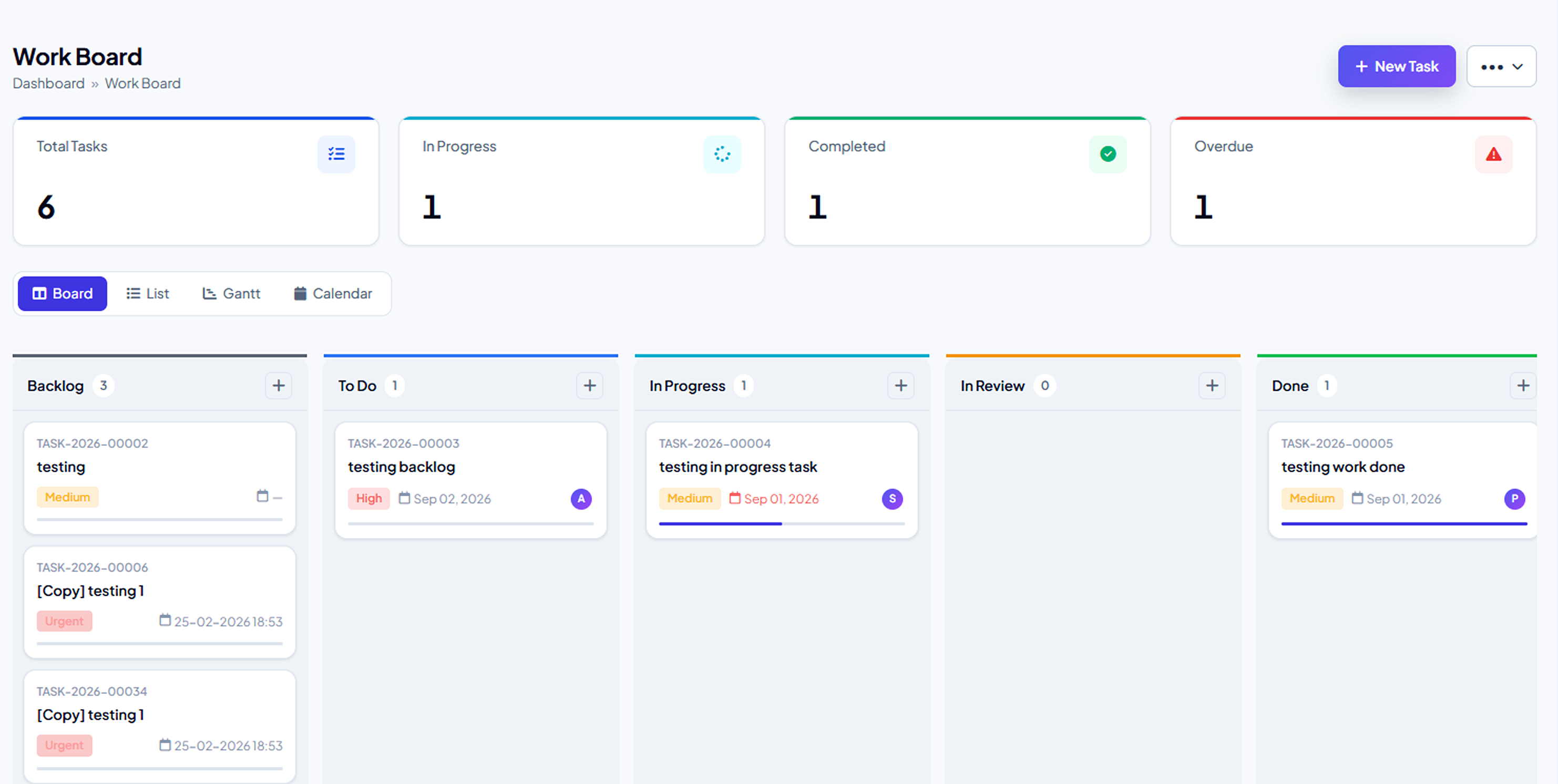
01 • Work Board

Board

Visual workflow across Backlog → To Do → In Progress → In Review with drag-and-drop, filters and quick-add.

  • ✓ Summary counts at the top for instant workload overview
  • ✓ Assignee avatars and progress bars on every card
  • ✓ Smooth drag-and-drop that auto-saves status
  • ✓ Filters by assignee, priority and date
  • ✓ Inline quick-add without leaving the board

Current

Basic cards with code, title, priority and deadline. Drag-and-drop is functional but limited.

Proposed

Richer cards with avatars, progress bars, auto-save, filters and quick-add for faster daily work.

Work Board • Kanban View
Work Board Kanban
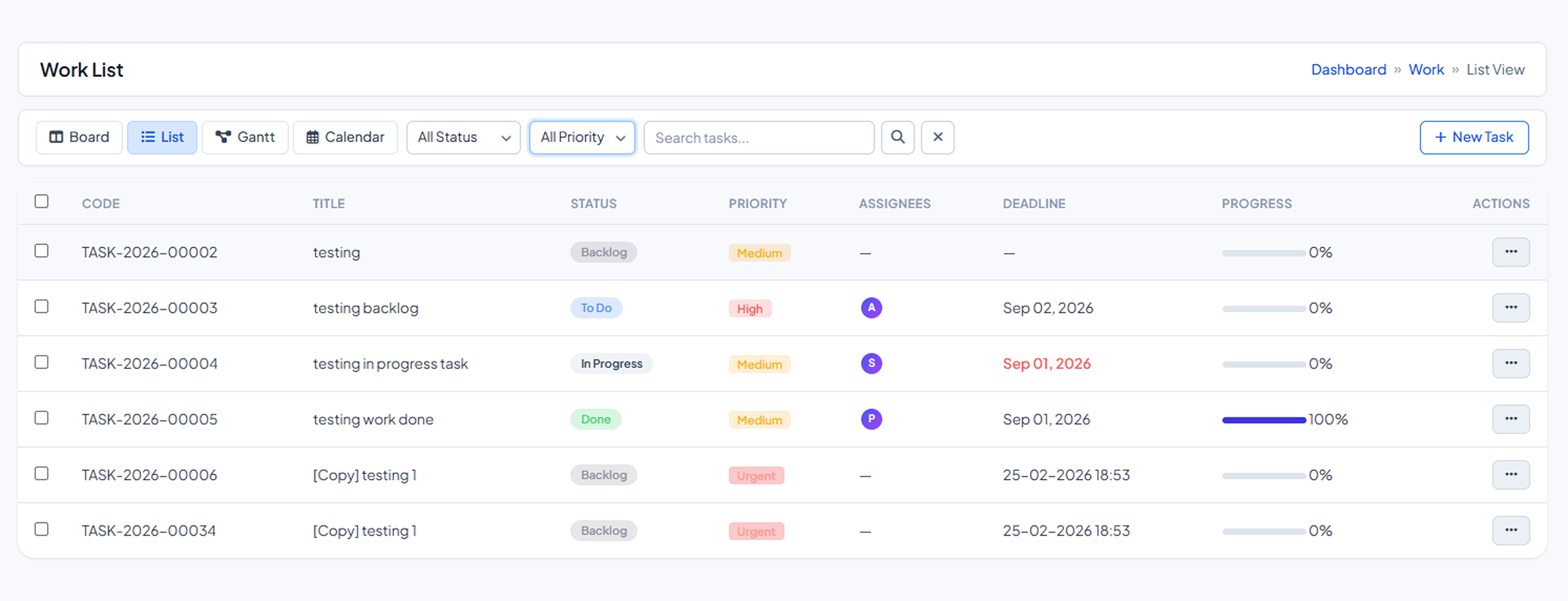
02 • List View

Work List View

Tabular view with search, filters, multi-select bulk actions, sortable columns and inline editing.

  • ✓ Multi-select bulk status change, assignment and deletion
  • ✓ Sortable column headers
  • ✓ Inline edit for title, priority and deadline
  • ✓ One-click Excel export and pagination

Current

Filters and search exist, but bulk actions and inline editing are missing.

Proposed

Full bulk operations, sortable headers, inline edits and Excel export for large task lists.

Work List • Tabular View & Bulk Actions
Work List View
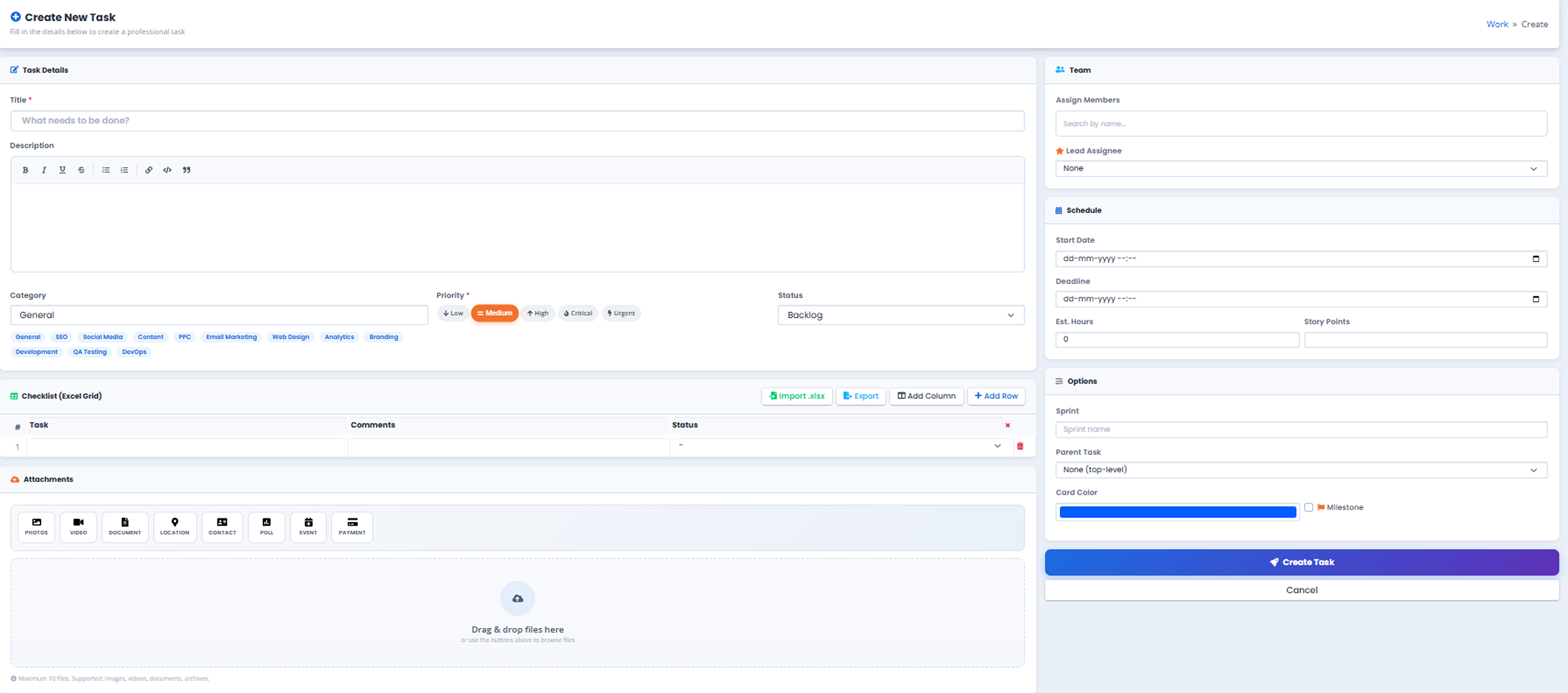
03 • Create Task

Create New Task

Tabbed form for Details, Team, Checklist and Files with templates, smarter validation and success toast.

  • ✓ Title, description, category, priority, status, hours, story points
  • ✓ Sprint, parent task, team assignment and attachments
  • ✓ Checklist with Excel import and visible progress
  • ✓ Ready-made and custom templates
  • ✓ Option to create another task after success
Create Task • Modal Wizard
Create New Task
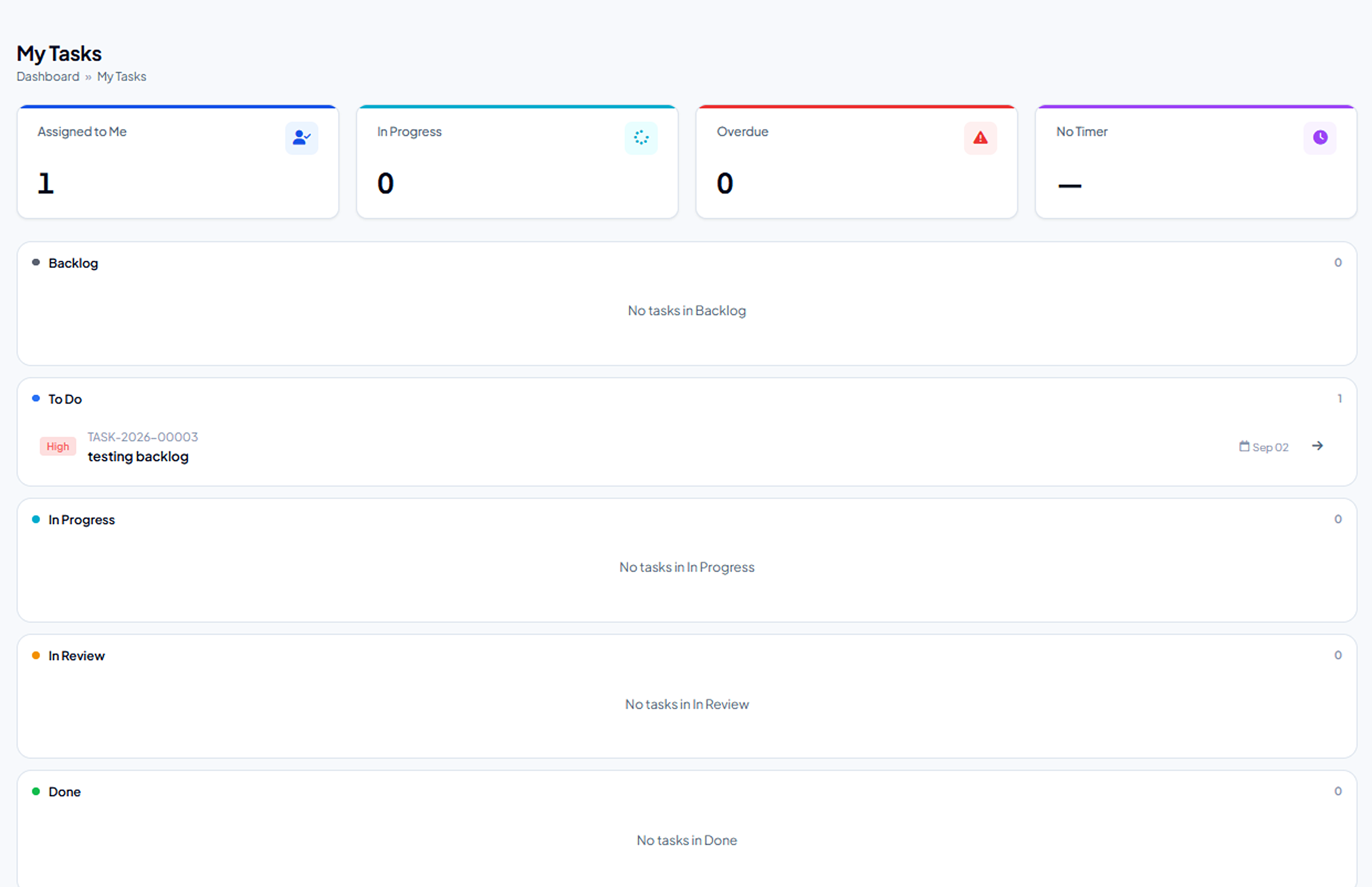
04 • My Tasks

My Tasks Dashboard

Personal execution workspace with counters, timer, sorting, alerts and mobile-friendly cards.

  • ✓ Assigned, In Progress and Overdue counters
  • ✓ One-click timer linked to the selected task
  • ✓ Sort by priority or deadline
  • ✓ Due-today and overdue alerts
  • ✓ Suggested next actions when list is empty
My Tasks • Personal Workspace
My Tasks Dashboard
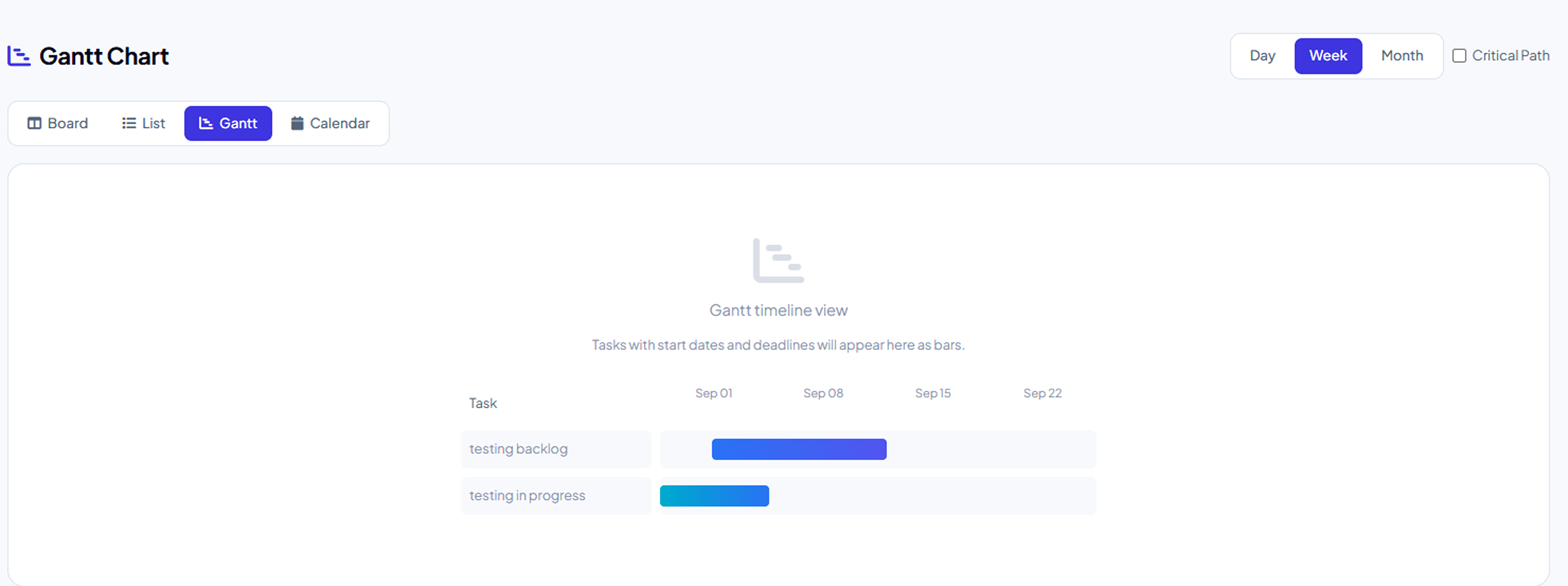
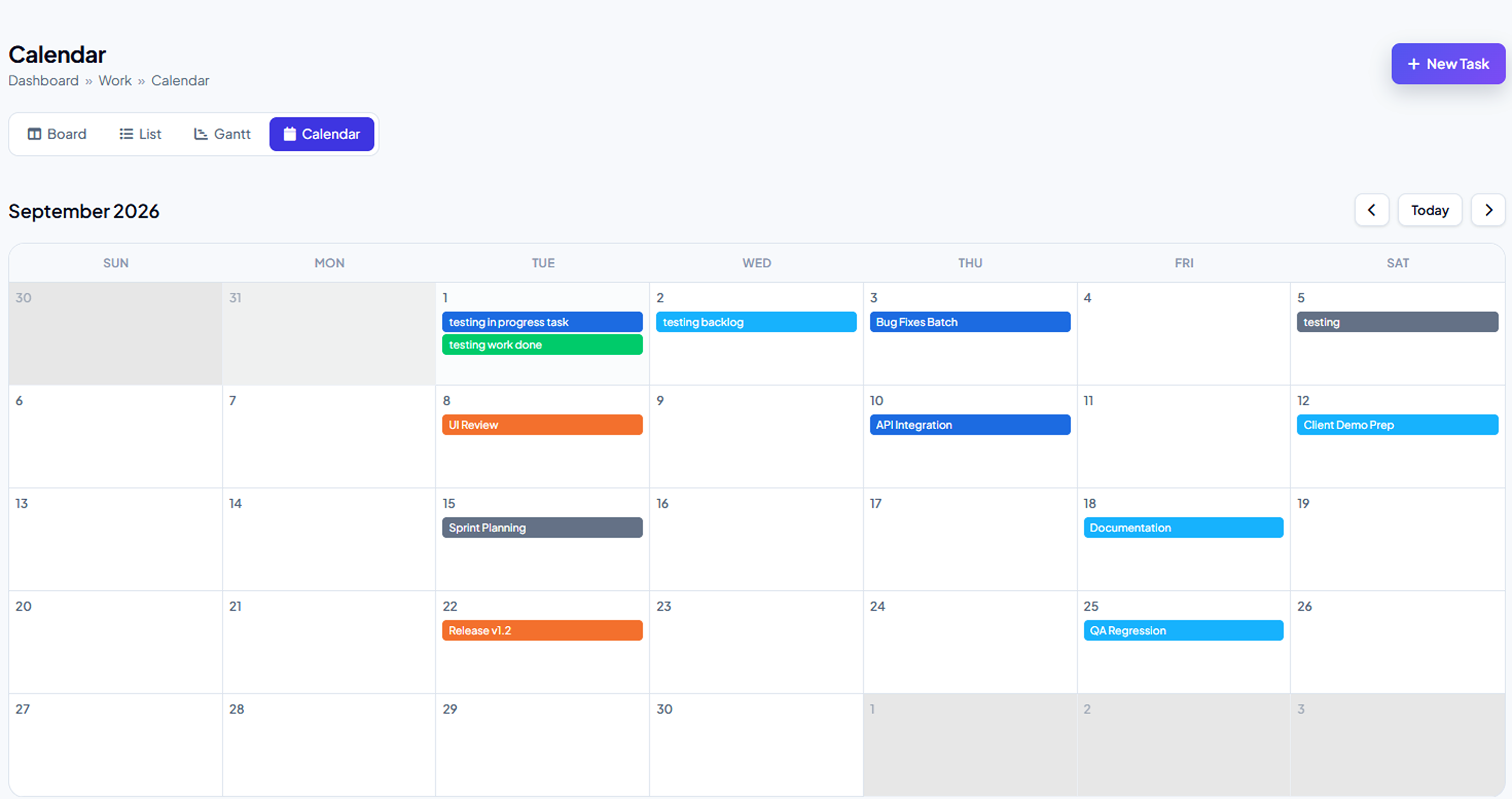
05 • Gantt & Calendar

Gantt Chart & Calendar

Timeline visibility with colored bars, dependency arrows, drag-to-resize and calendar task chips.

  • ✓ Day, Week and Month views
  • ✓ Colored task bars with titles and dependency arrows
  • ✓ Drag-to-resize dates and custom date-range zoom
  • ✓ Critical Path toggle for schedule-sensitive work
  • ✓ Calendar shows task chips on due dates
Gantt Chart • Dependencies & Milestones
Gantt Chart
Calendar • Due Dates & Schedules
Calendar View
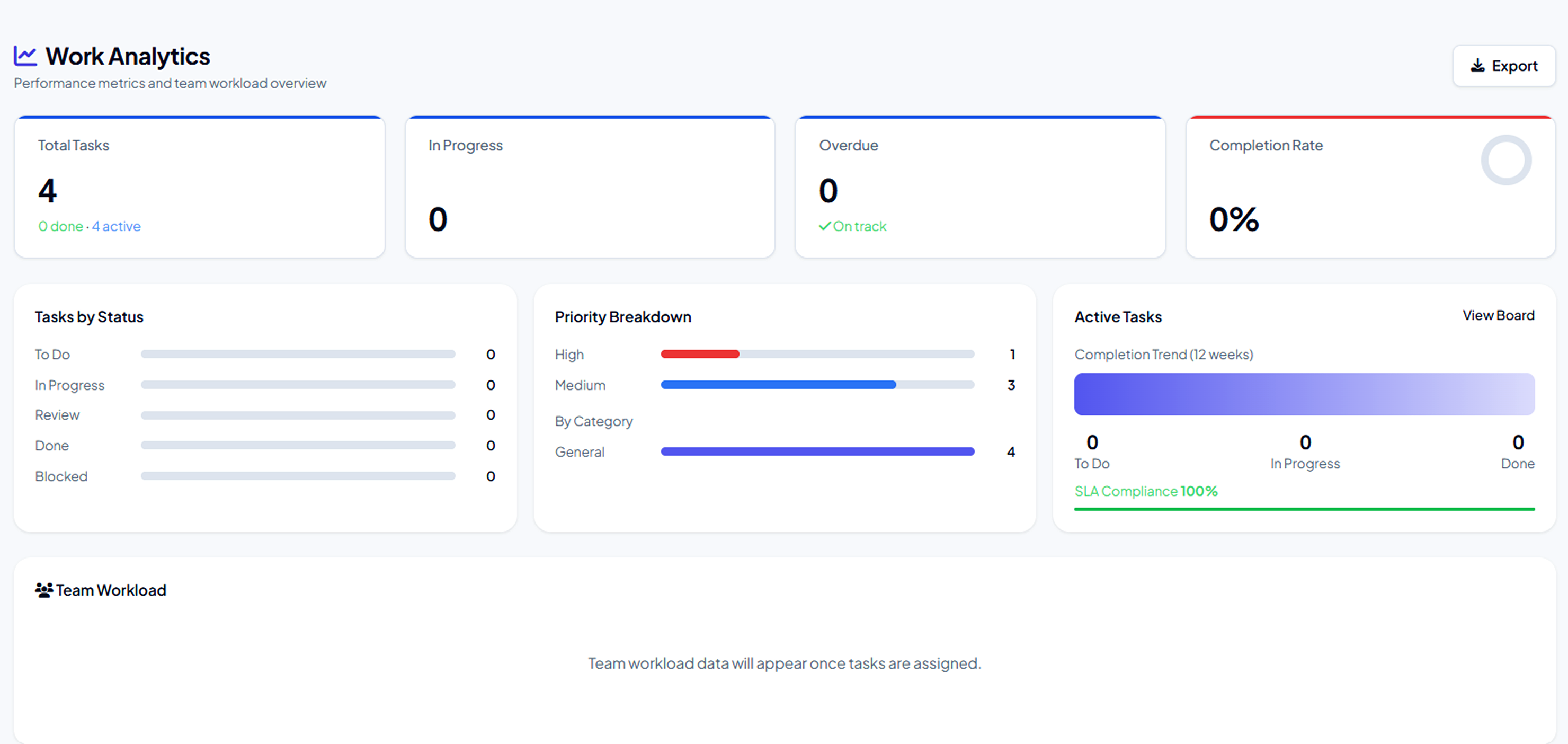
06 • Analytics

Work Analytics

Interactive dashboards with custom date range, team filter, drill-down charts and PDF/Excel export.

  • ✓ Total, In Progress, Overdue and Completion Rate
  • ✓ Status, Priority and Category breakdowns
  • ✓ SLA compliance tracking
  • ✓ Period comparison and interactive drill-down
  • ✓ One-click PDF / Excel export
Analytics • Performance & Completion Dashboards
Work Analytics
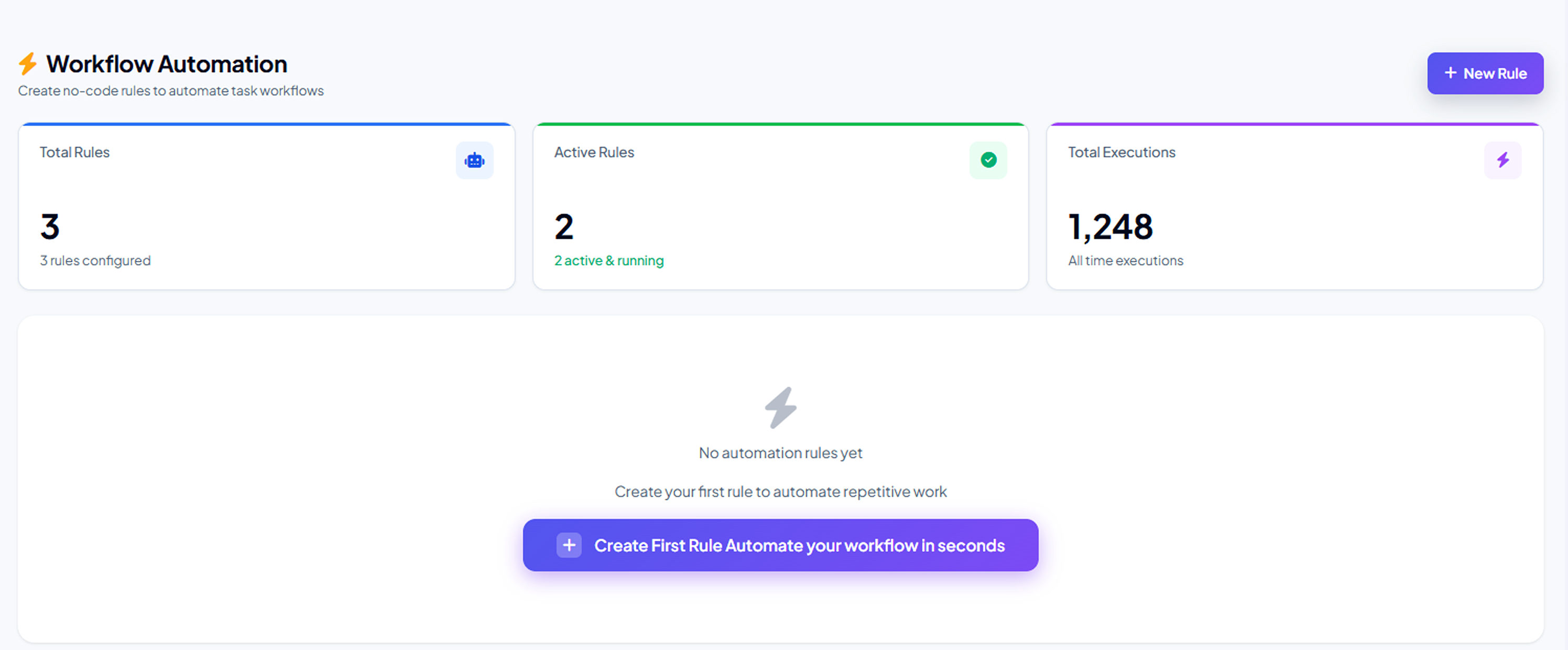
07 • Automation

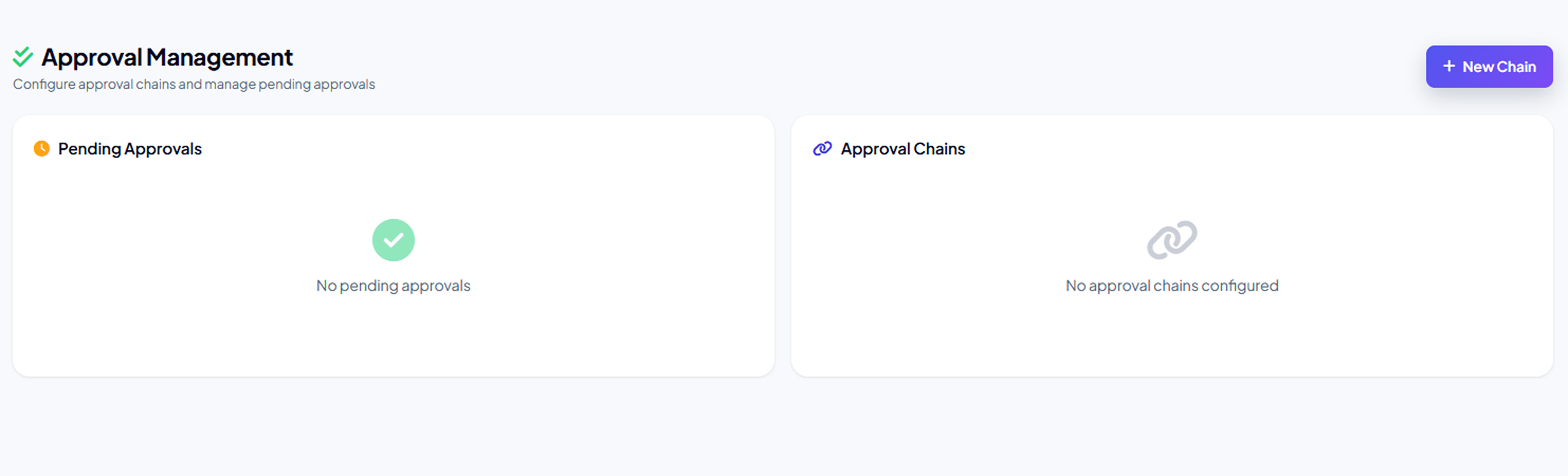
Automation & Approvals

No-code If-Then rules and multi-level approval chains with escalation and execution history.

  • ✓ Triggers: status, deadline, assignee
  • ✓ Actions: notify, re-assign, change status
  • ✓ Multi-level approval chains with escalation
  • ✓ Execution history for audit and governance
Automation • Trigger Rules
Workflow Automation
Approvals • Multi-Level Decision Chains
Approval Management
08 • Templates & Sprints

Templates & Agile Sprints

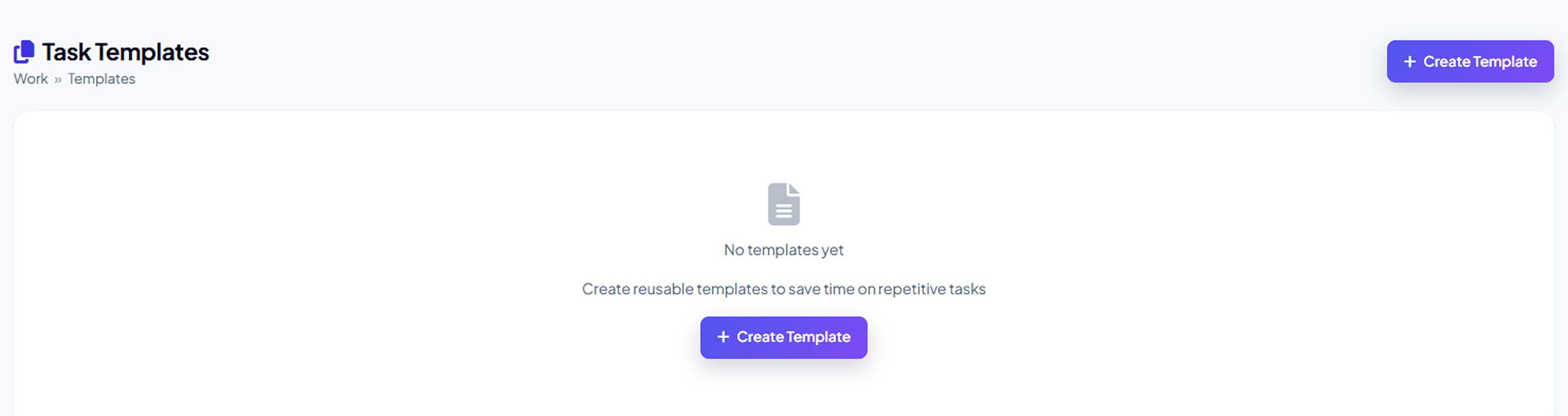
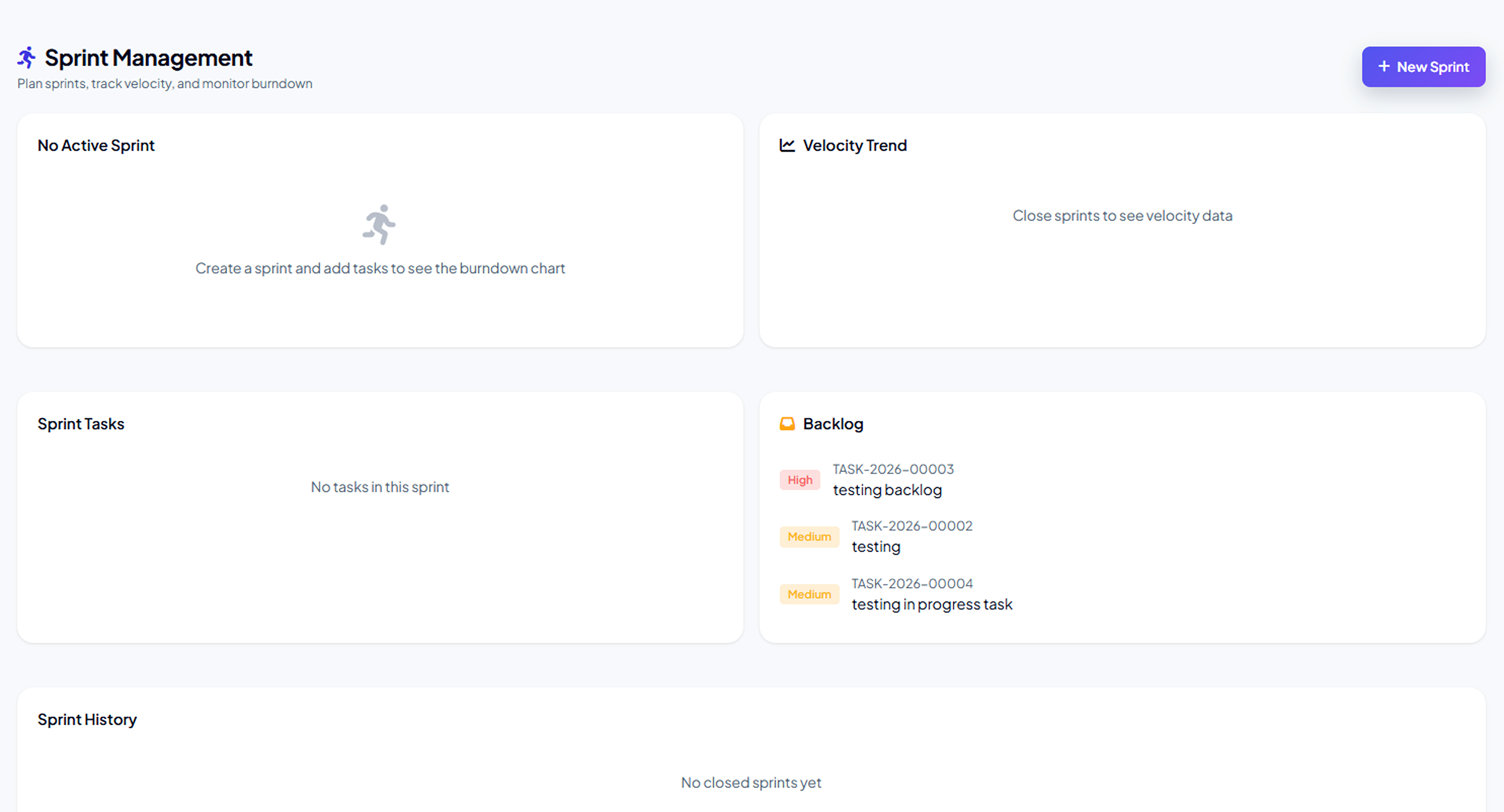
Ready-made and custom templates plus a full sprint lifecycle with burndown and velocity.

  • ✓ Ready-made and custom task templates
  • ✓ Sprint wizard: name, dates, goal, capacity
  • ✓ Drag tasks from backlog into the sprint
  • ✓ Live daily burndown and automatic velocity
Templates • Standard Operating Procedures
Task Templates
Sprints • Burndown & Velocity Lifecycle
Sprint Management
09 • Resource & SLA

Resource Planning & SLA

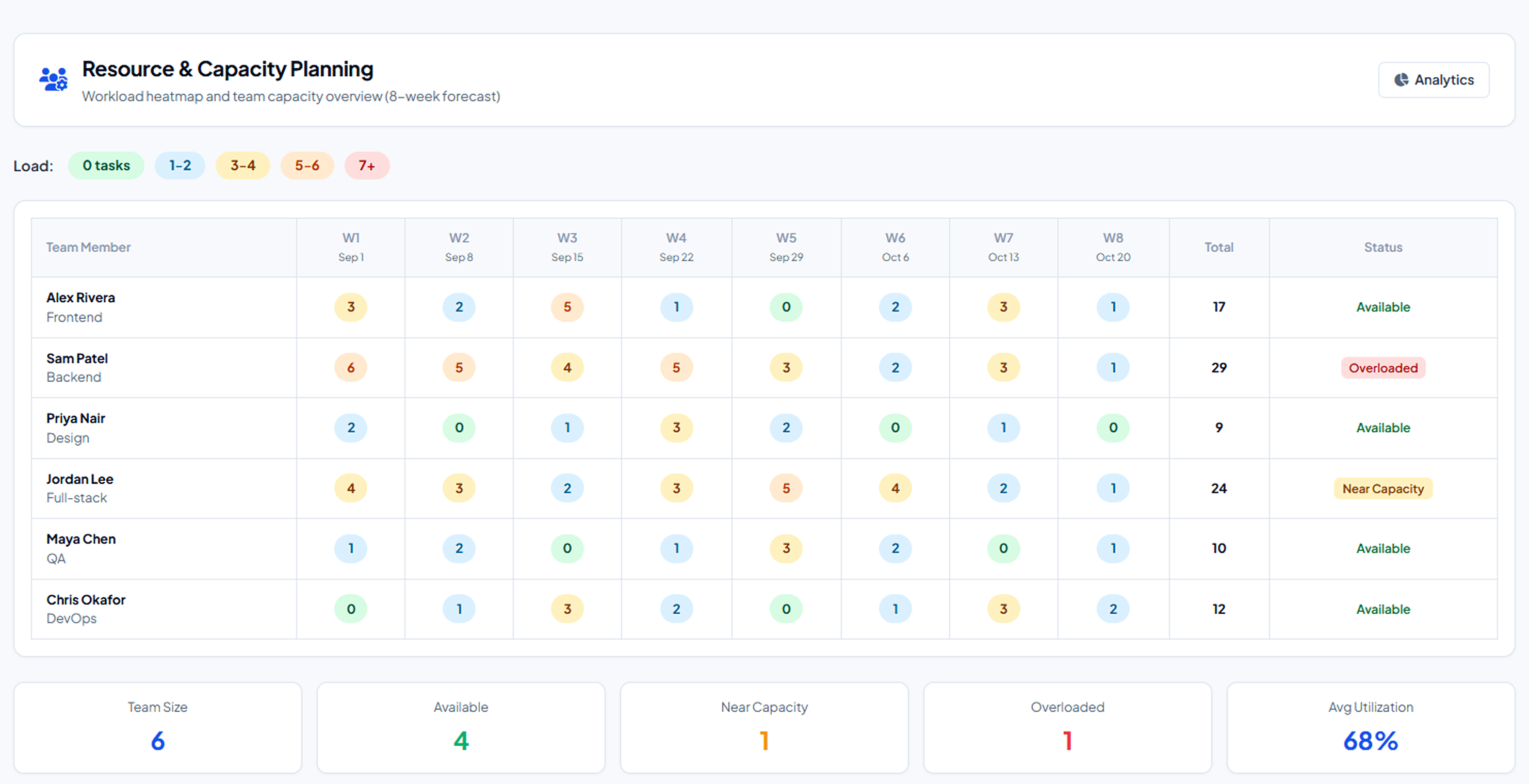
Capacity color scale, hours-based planning, drag-to-assign and SLA policy wizard with auto-escalation.

  • ✓ Green-yellow-red capacity scale per member
  • ✓ Hours-based capacity before assigning work
  • ✓ Drag a task onto a member to assign
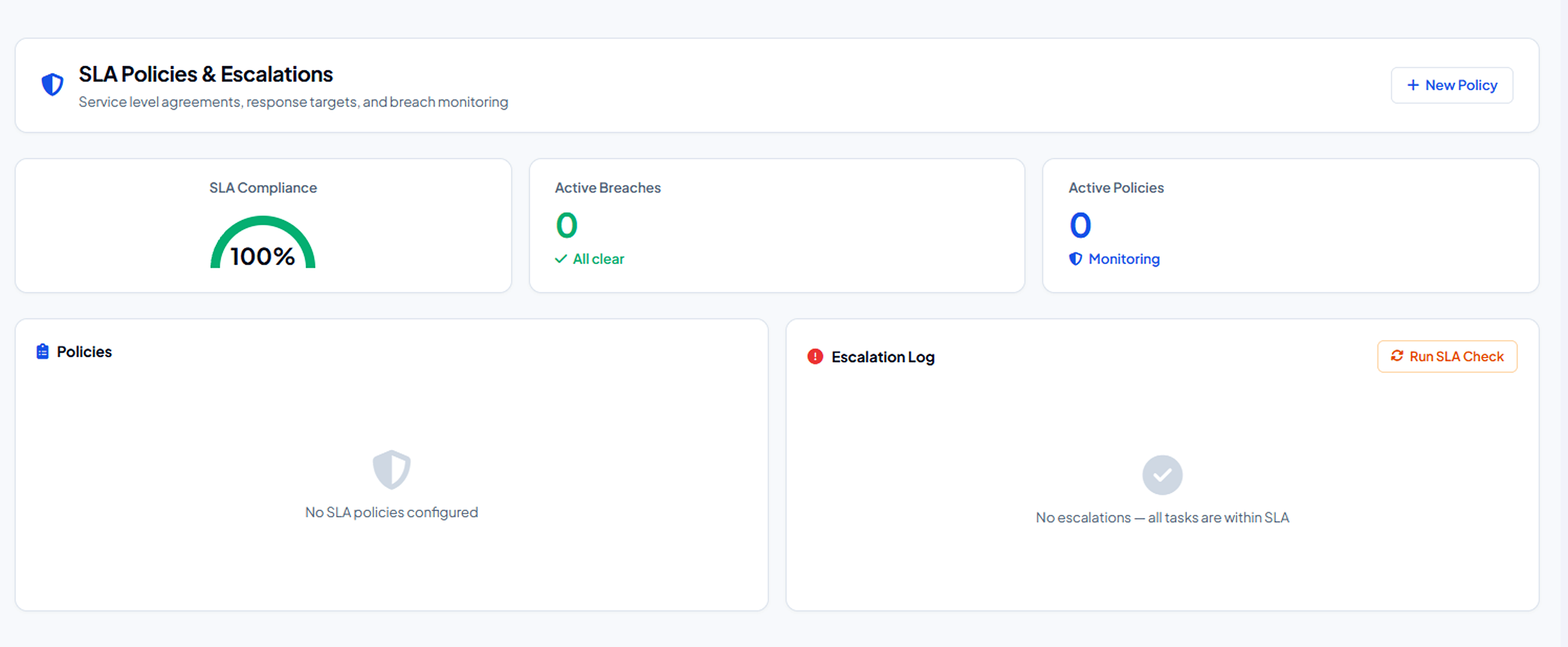
  • ✓ SLA policy wizard with automatic escalation
  • ✓ Breach notifications and compliance tracking
Resource Management • Workload Heatmaps
Resource & Capacity Planning
SLA Management • Thresholds & Escalation
SLA Policies & Escalations
PRICING

Simple, Per-User Work Pricing

Coordinate tasks, sprints and projects with agile Kanban boards and custom automated workflows.

STARTER
₹199
/ user / month

For small agile teams up to 10 users.

  • Up to 10 team members
  • Kanban boards & List views
  • Task assignment & milestones
  • File attachments & comments
  • Basic activity audit log
ENTERPRISE
Custom
Contact Sales

For enterprises requiring advanced governance.

  • Unlimited team members
  • Custom roles & permissions
  • Cross-project portfolios
  • Dedicated Account Manager
  • REST API & webhook connectors
  • Single Sign-On (SSO) & 99.9% SLA

* Billed annually or monthly. Need custom integrations or enterprise migration? Contact Sales.

START STREAMLINING WORK TODAY

Transform team execution with Microhub Work Module.

Give your teams clarity, eliminate workflow friction, automate repetitive approvals, and monitor SLAs in real time.