Every visitor, from reception desk to secure exit.

  • QR Pre-Registration
  • Biometric & Face ID
  • Audit-Ready Compliance
0 Paperless & Auditable
0 Average Check-In Speed
0 Guided Kiosk Experience
0 Unified Visitor Suite
Live Operations Cockpit

Real-time visitor visibility from arrival to exit.

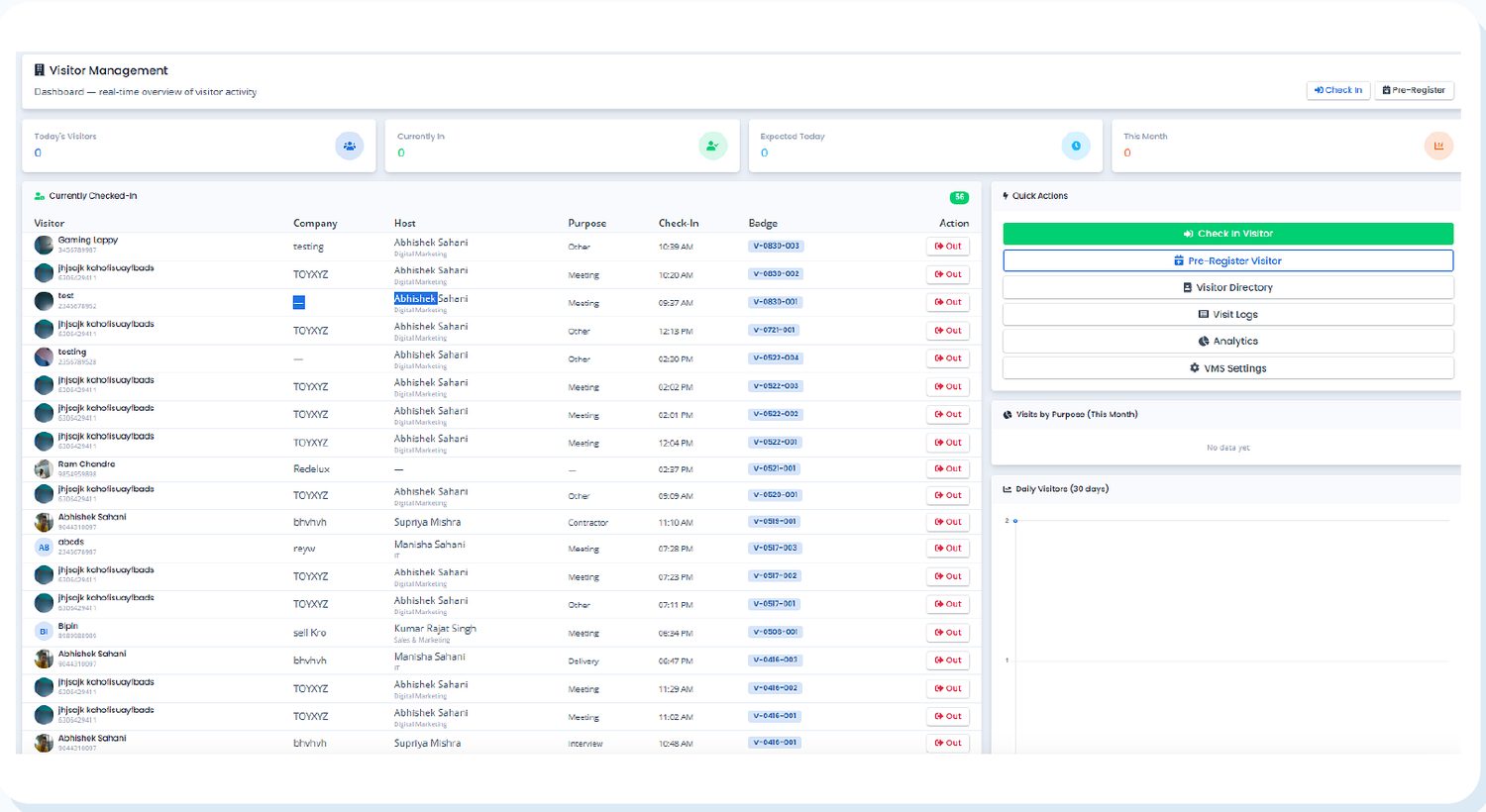
A unified administrative console providing live headcount, checked-in guests, expected meetings, purpose breakdowns, and instant badge controls designed for rapid reception management.

https://vms.microhub.in/dashboard
Microhub VMS dashboard showing currently checked-in visitors, hosts, purposes and badge numbers
The Live VMS Dashboard: Unified view of today's visitors, currently checked-in guests, expected arrivals, and instant security actions. ● Live Operations

Real-time guest headcount

Know exactly who is inside your facility at any second. Checked-in guests, visit duration, assigned hosts, and badge numbers update dynamically across all terminals.

Automated host notifications

Eliminate reception bottlenecks. Hosts receive immediate push notifications and email alerts with visitor details the instant check-in is submitted.

One-click checkout & audit trail

Check out visitors instantly via reception click, kiosk self-service, or phone number lookup, leaving a timestamped, tamper-proof security log.

Platform Modules

Twelve modules, one unified visitor platform.

Everything reception desks, hosts, safety officers, and facility administrators need to run guest visits end-to-end with enterprise compliance.

01

Dashboard

Real-time view of today's visitors, currently checked-in guests, expected appointments, and monthly facility trends.

02

Walk-In Check-In

Fast walk-in registration with phone lookup, host assignment, visit purpose, vehicle recording, and carried items.

03

Pre-Registration

Schedule guests ahead of time; system automatically generates and emails a personalized QR code invite.

04

QR Check-In

Pre-registered visitors scan their email QR code at reception or tablet kiosk for instant, touchless entry.

05

Host Notifications

Immediate push notifications and email alerts sent to employees the moment their visitor checks in at the door.

06

Badge & Pass Issuance

Auto-generated visitor badge numbers with custom prefixes, scannable QR passes, and thermal badge printer support.

07

Kiosk Mode

Self-service dark-mode tablet interface empowering visitors to register, scan QR passes, and check out autonomously.

08

Visit Purposes

Configurable categories including Meeting, Interview, Delivery, Vendor, and Contractor with custom color badges.

09

Security Controls

Strict safety gates: host approval requirements, live visitor photo capture, government ID capture, NDA signature, and consent.

10

Calendar Integrations

Two-way synchronization with Microsoft Outlook and Google Calendar to automatically schedule guest passes from meeting invites.

11

Visitor Analytics

Comprehensive analytics: peak arrival times, visit frequency by purpose, host meeting volumes, and downloadable audit logs.

12

Central Settings

Configure auto-checkout rules, escalation contacts, kiosk fleet devices, custom welcome banners, and company policies.

End-to-End Journey

The complete visitor workflow from arrival to exit.

A structured, automated process ensuring security compliance, zero delays at the gate, and full transparency for hosts and safety managers.

01

Pre-Register Visitor (Optional)

The host or reception pre-books the visitor in advance with expected date and time. The system automatically sends a calendar invitation with an encoded QR entry pass.

Actor: Host / Reception Channel: Automated Email
02

Visitor Arrives at Facility

The walk-in or pre-registered guest reaches your building reception or self-service lobby kiosk.

Location: Office Reception / Lobby Touchpoint: Desk or Kiosk
03

Fast Check-In & Identity Capture

Details are recorded or the QR invite is scanned. Purpose of visit, host selection, photo capture, and vehicle details are confirmed.

Action: QR Scan or Form Output: Badge Number Generated
04

Instant Host Notification

The host receives real-time push and email alerts announcing the guest's arrival, including the guest's photo, company name, and badge ID.

Delivery: Push & Email Alert Latency: < 2 seconds
05

Host Approval Gate (Optional Policy)

For high-security facilities, the host must approve the visit with one click on their phone or email before the physical or digital badge is printed.

Policy: Conditional Security Gate Pre-Reg: Configurable Bypass
06

Active Visit & Live Headcount

The guest is admitted into the facility and appears on the Currently Checked-In register with timestamp, purpose, and badge identification.

Status: Currently Checked In Register: Live Dashboard
07

Touchless Check-Out

On completion of the visit, the guest checks out via reception button, QR code tap at the kiosk, or phone number lookup. Auto-checkout rules close unclosed sessions.

Method: QR Tap / Reception / Phone Fail-safe: Auto-checkout Timer
08

Audit Logging & Analytics

Complete historical records, purpose distributions, duration calculations, and compliance exports are preserved in the central administrative log.

Compliance: Digital Audit Trail Export: Excel & PDF Ready
Reception Operations

Walk-in check-in in under ten seconds.

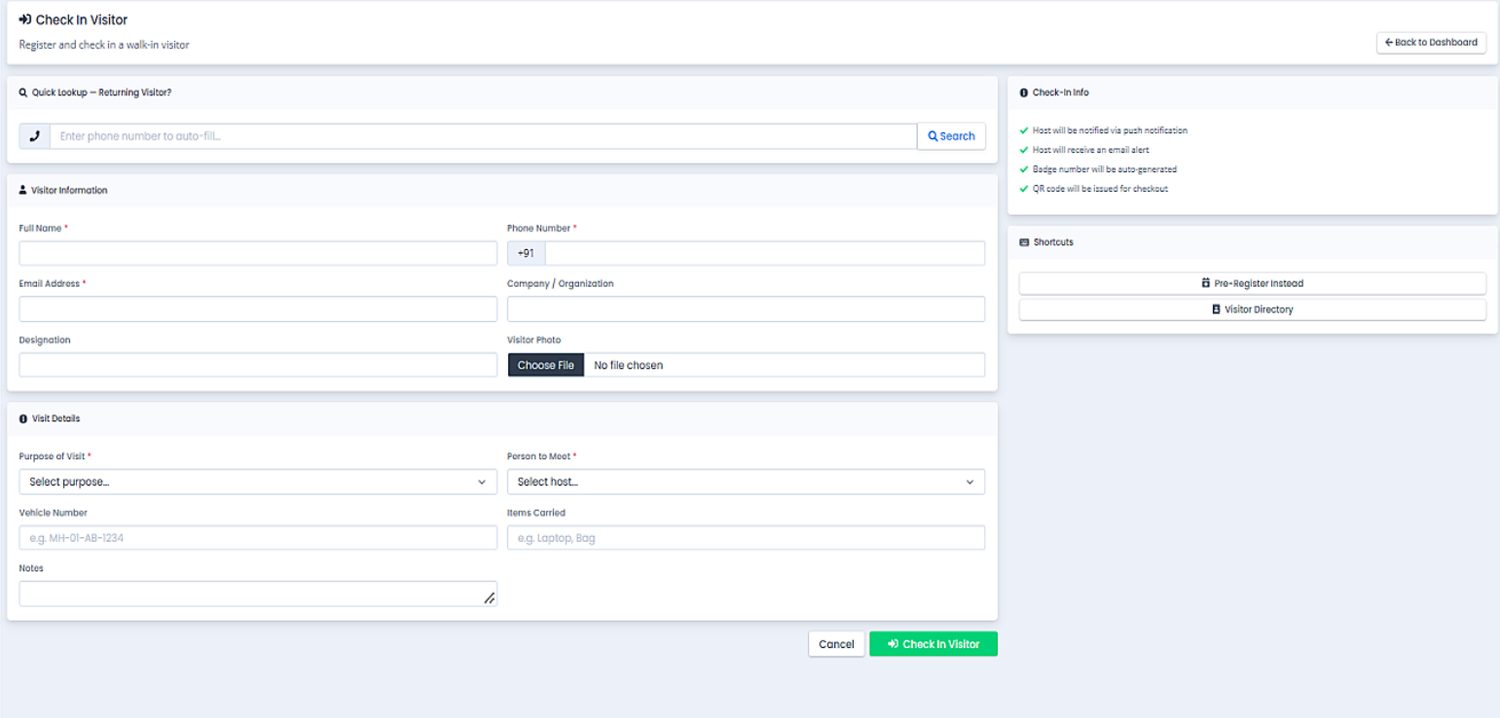
Receptionists register and check in unscheduled guests rapidly without paperwork. Returning visitors are retrieved instantly via phone number lookup.
  • ✔
    Quick Visitor Lookup: Enter phone number to auto-fill returning guest profile, company, and past hosts.
  • ✔
    Complete Information Capture: Name, email, mobile, company, designation, and optional camera snapshot.
  • ✔
    Host & Purpose Matching: Select host employee with smart auto-suggest and choose purpose category with color tags.
  • ✔
    Vehicle & Assets Log: Record vehicle registration numbers, laptops, or visitor items carried into the building.
  • ✔
    Auto Badge Issuance: One-click submission generates badge number and notifies the host immediately.
Badge Auto-Generated Host Auto-Notified Fast-Pass Lookup
Check In Visitor form with quick lookup, visitor information and visit details Walk-In Check-In Screen
Pre-Registration & Invites

Pre-register visitors with automated QR passes.

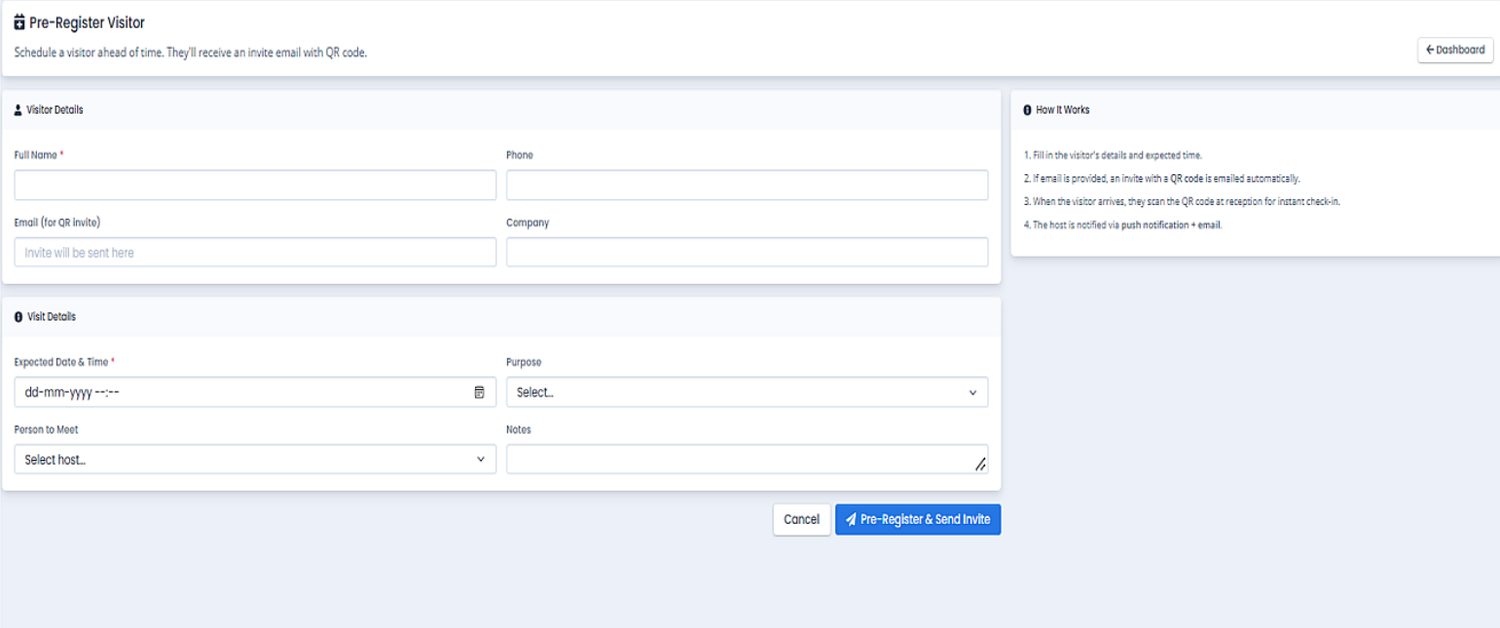
Hosts or reception pre-schedule client meetings, interview candidates, or vendor visits. The system automatically sends an branded email with an encrypted QR pass.
  • ✔
    Advance Appointment Booking: Specify visitor name, company, meeting purpose, and expected arrival date/time.
  • ✔
    Automated QR Email Invites: Guests receive professional email invites containing meeting details and check-in QR codes.
  • ✔
    Instant Gate Scanning: Guests scan their mobile QR pass directly at reception or self-service kiosk on arrival.
  • ✔
    Configurable Approval Bypass: Pre-approved visitors bypass front-desk queues directly without secondary clearance.
  • ✔
    Real-Time Arrival Notifications: Hosts receive immediate push and email confirmations when their guest scans in.
Pre-Register Visitor form with expected date and time and Send Invite button Pre-Registration & QR Invites
Touchless Kiosk Mode

Self-service dark-mode kiosk for new guests, QR and check-out.

Empower visitors to check in, sign digital NDAs, capture badges, and exit autonomously using dedicated tablet terminals deployed at your building entrances.

New Visitor

Register as a new walk-in guest, capture camera photo, sign safety guidelines, and receive a printed or digital access pass.

Check In with QR

Already received an invite? Hold your email QR pass up to the tablet front camera for zero-touch sub-second gate check-in.

Fast Check Out

Leaving the building? Scan your badge QR or enter your mobile number to close your visit session and timestamp your exit.
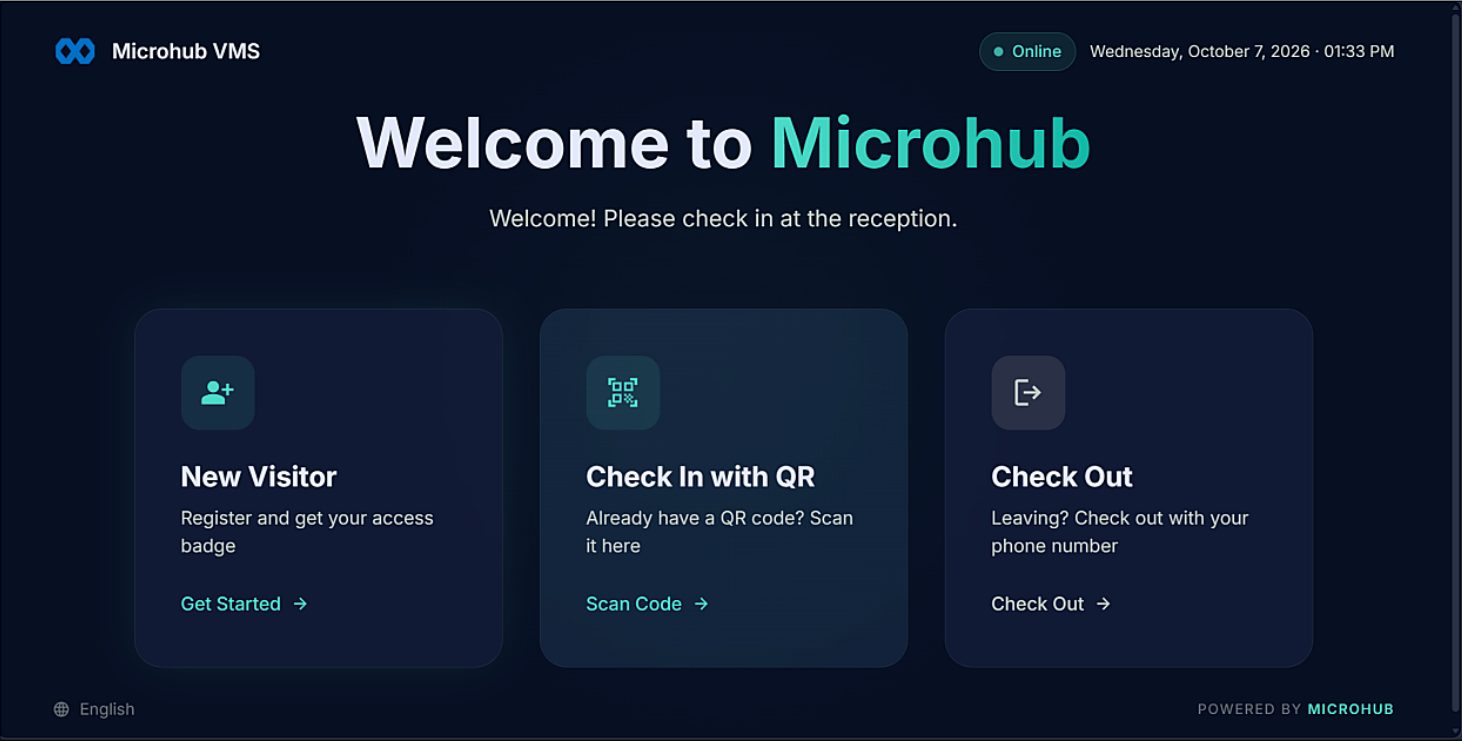
Kiosk welcome screen with New Visitor, Check In with QR and Check Out
Kiosk Welcome Screen: Minimalist three-choice landing interface designed for zero user friction.
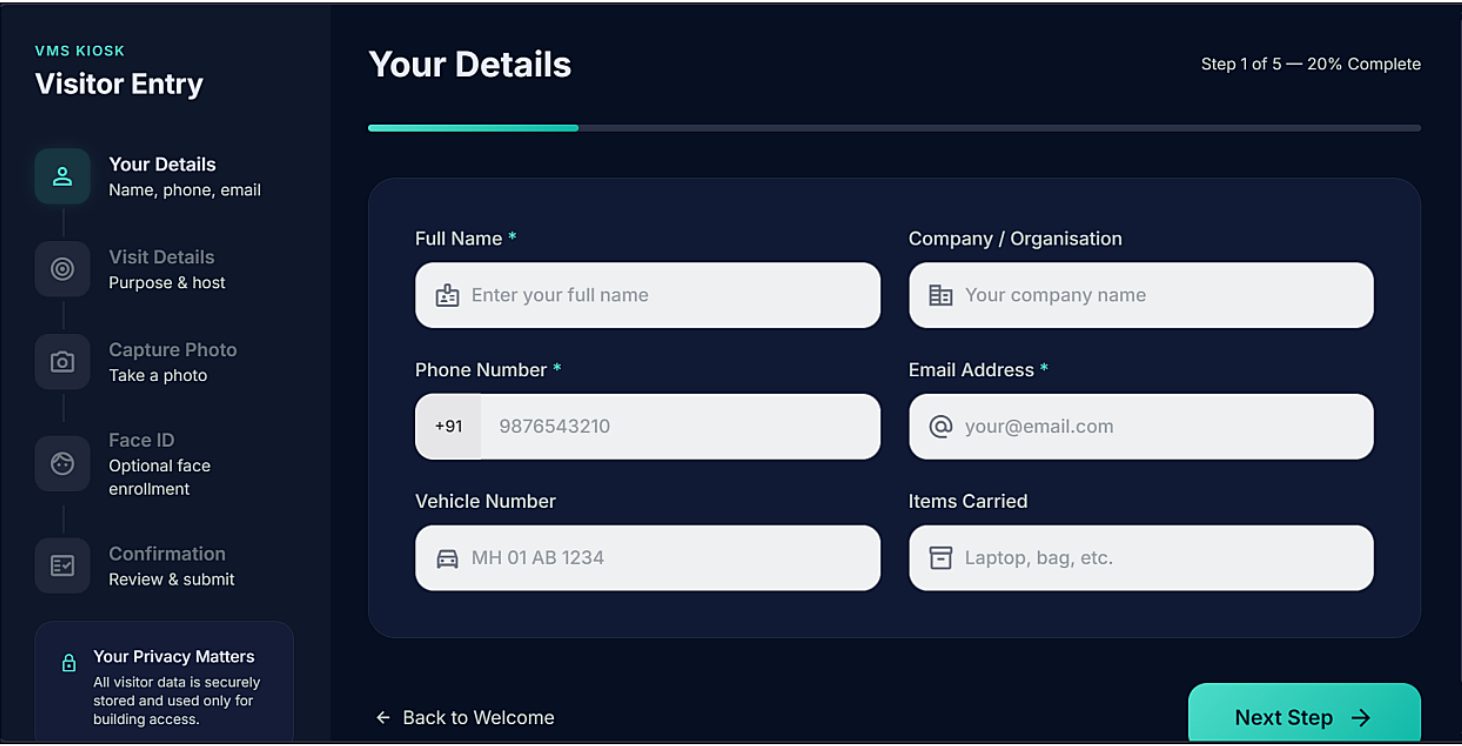
Kiosk visitor entry form with progress bar and privacy notice
5-Step Guided Entry Form: Step-by-step visitor onboarding with built-in privacy protection and consent.
1 Your Details (Name, Phone, Email)
2 Visit Details (Purpose & Host)
3 Capture Photo (Live Camera)
4 Face ID & Liveness (Optional)
5 Confirmation & Badge
Compliance & Governance

Settings, policies, and security controls.

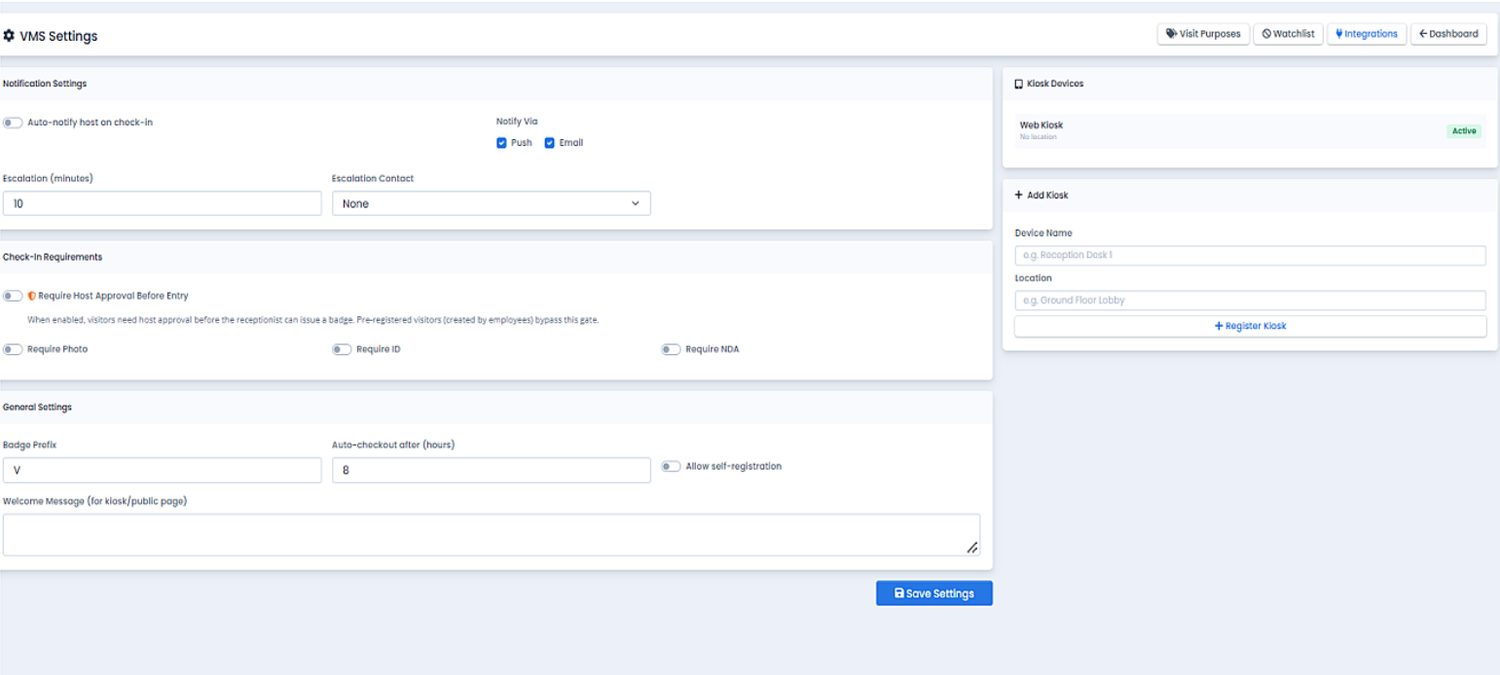
Facility and IT directors maintain granular authority over access requirements, escalation rules, custom badge nomenclature, and kiosk device authorization.
  • ✔
    Automated Host Notifications: Configure instant alerts via Push and Email with custom notification templates.
  • ✔
    Host Escalation Timer: Set fallback minutes and designated secondary contacts if the primary host is unreachable.
  • ✔
    Mandatory Host Approval Gate: Require host sign-off before printing badges, with configurable bypass for pre-approved guests.
  • ✔
    Security Document Enforcement: Toggle mandatory live photo capture, government ID scan, NDAs, and consent checkboxes.
  • ✔
    Badge Prefix & Auto-Checkout: Customize badge sequences (e.g., V-001) and enforce automatic session closing after X hours.
  • ✔
    Kiosk Fleet Management: Authorize and monitor tablet terminals across distinct gates, towers, and branch locations.
VMS Settings screen with notification settings, check-in requirements, general settings and kiosk devices VMS Security & Policy Controls
Categorization & Ecosystem

Custom visit purposes and calendar integrations.

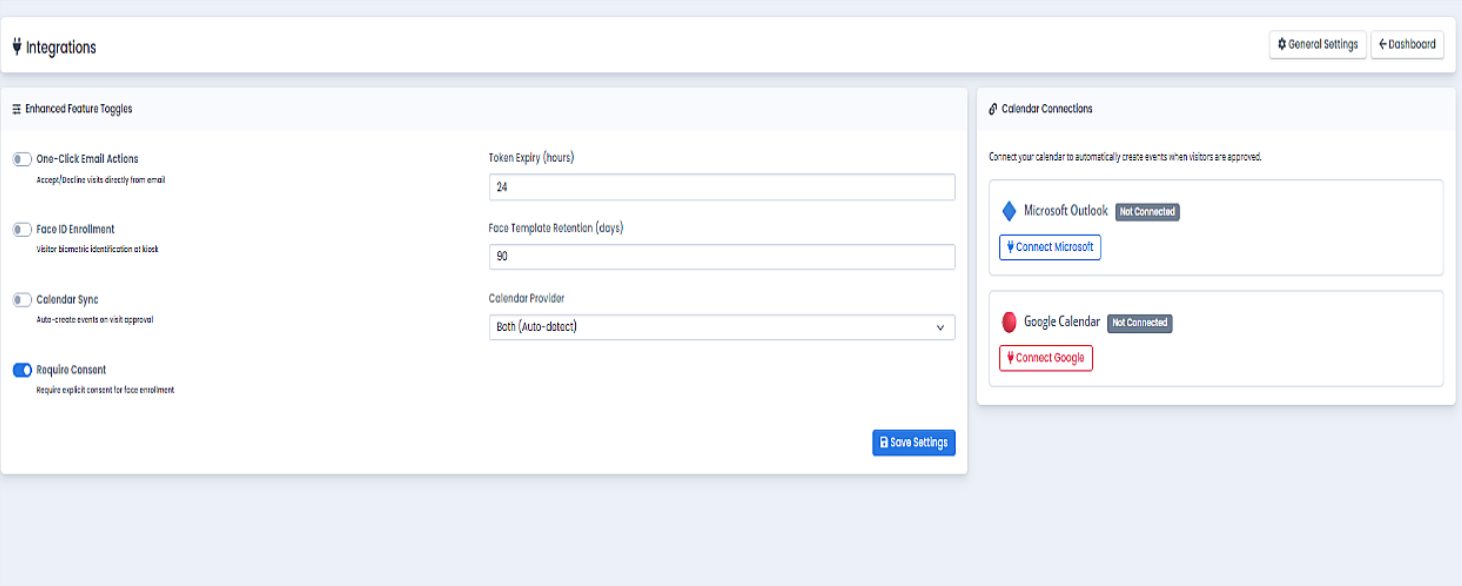
Categorize workplace traffic with vibrant color-coded purposes and synchronize visitor invites directly with enterprise Outlook and Google calendars.
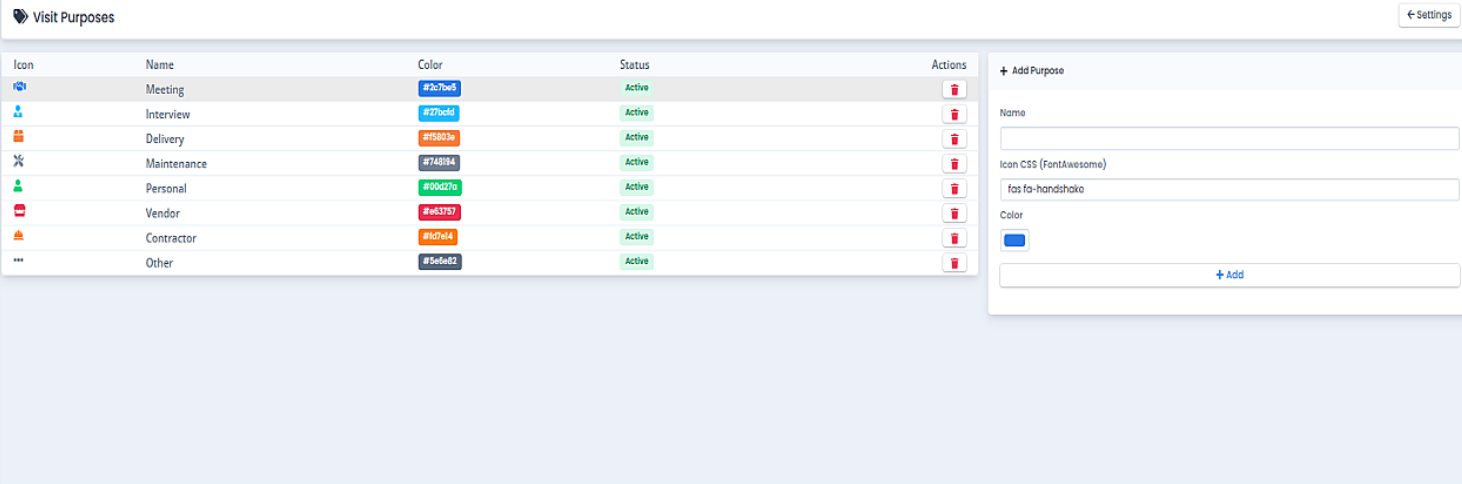
Meeting Interview Delivery Maintenance Personal Vendor Contractor Other
  • ✔
    Two-Way Calendar Sync: Connect Microsoft Outlook and Google Calendar to automatically generate passes from meeting invites.
  • ✔
    Face ID Enrolment Support: Optional biometric facial recognition for frequent contractors and VIP visitors.
  • ✔
    One-Click Email Actions: Hosts can approve or reject visitor access requests straight from notification emails.
  • ✔
    Digital Consent Tracking: Retain timestamped GDPR and privacy consent records for every checked-in guest.
Visit Purposes list with icons, colours and status
Integrations screen with calendar connections
Purposes & Integrations Hub
Role-Based Walkthrough

Guided steps for every person in your workplace.

Select a role below to explore how reception staff, meeting hosts, arriving visitors, and security administrators navigate Microhub VMS.

Reception: Checking In Walk-In Visitors

  1. Open the VMS Console and click Check In Visitor from the top actions bar.
  2. Input the visitor's mobile number; if they have visited before, profile information auto-populates immediately.
  3. Select the intended employee host and choose the purpose of visit (Meeting, Interview, Delivery, etc.).
  4. Record vehicle numbers or items carried if building security policy mandates asset tracking.
  5. Click Submit Check-In. The visitor badge is generated, and the host receives an instant alert.

Host: Pre-Registering Guests & Scheduling

  1. Click Pre-Register Visitor from your dashboard or book directly via Outlook / Google Calendar invite.
  2. Enter guest name, email address, expected arrival date, and meeting room details.
  3. The system instantly dispatches a customized email to the guest containing an encrypted entry QR code and visit guidance.
  4. Receive a push notification on your mobile the second the guest touches the scanner in the lobby.
  5. Review and grant one-click approval if your company enforces access gates for your department.

Visitor: Using Self-Service Lobby Kiosk

  1. Touch the kiosk screen and choose New Visitor or tap Check In with QR.
  2. If pre-registered, hold your mobile screen up to the camera to scan your QR pass for instant check-in.
  3. If walk-in, follow the 5 guided screens: enter details, choose who you are meeting, capture your photo, and sign guidelines.
  4. The terminal confirms check-in and provides your digital badge identification.
  5. Take a seat in the waiting lounge; your host has already been alerted of your arrival.

Checking Out & Closing Sessions

  1. At reception: staff locate the visitor on the Currently Checked-In register and click the Out action button.
  2. At kiosk: visitors tap Check Out on the tablet and enter their mobile number or scan their badge QR.
  3. The system records the exact departure timestamp and marks the visit as completed.
  4. Automatic session guard: unclosed visits are closed by policy at preset hours (e.g., 20:00) with audit markers.

Administrator: Governance & Configuration

  1. Open VMS Settings to configure host notification channels, escalation contacts, and auto-checkout limits.
  2. Manage Visit Purposes: add custom categories, map color codes, and assign specific NDA documents.
  3. Under Kiosk Devices, register web kiosk tablets by location name, terminal ID, and branch.
  4. Connect Enterprise Integrations for Microsoft 365, Google Workspace, and biometric hardware terminals.
  5. Monitor daily visitor volume graphs and export tamper-proof compliance logs for corporate audits.
Enterprise Advantages

Why leading workplaces trust Microhub VMS.

Engineered for corporate headquarters, manufacturing facilities, shared business parks, tech campuses, and regulated enterprises.

Professional First Impression

Replace untidy paper logbooks with modern digital kiosk check-in, personalized QR invites, and branded visitor badges.

Rapid Reception Processing

Reduce lobby wait times from several minutes to under ten seconds through returning-guest lookup and QR pass scanning.

Live Building Headcount

Always know who is inside your facilities for security reviews, visitor monitoring, and life-safety evacuation procedures.

Zero Host Waiting

Hosts receive immediate push notifications and emails when guests check in, ensuring meetings start promptly on time.

Security & Compliance

Enforce mandatory visitor photos, govt ID verification, NDA e-signatures, and host approvals before entry is granted.

Tamper-Proof Audit Trail

Every arrival, check-in, badge issuance, and departure timestamp is preserved digitally with comprehensive export capabilities.

Autonomous Kiosk Reception

Provide 24/7 lobby autonomy without dedicated front-desk staff using guided self-service tablet kiosks.

Calendar Integration

Seamlessly synchronizes with Microsoft Outlook and Google Calendar to issue QR passes straight from calendar meeting invites.

Fully Configurable Rules

Tailor visit purposes, auto-checkout timers, custom welcome banners, and badge prefixes to match your organization's exact needs.

PRICING

Modern Visitor Management Pricing

Streamline front-desk check-in, issue QR visitor passes, automate host notifications, and secure your facilities.

STARTER
₹799
/ location / month

For single-facility offices up to 500 visitors/month.

  • 1 check-in kiosk / tablet device
  • Up to 500 visitors / month
  • Instant WhatsApp & SMS host alerts
  • Digital badge & visitor pass generation
  • Real-time check-in log & audit history
ENTERPRISE
Custom
Contact Sales

For multi-branch campuses & high-security facilities.

  • Unlimited kiosks, branches & gates
  • AI Facial recognition check-in
  • Multi-tenant lobby management
  • Centralized corporate audit logs
  • Dedicated Account Manager
  • Active Directory / SSO & 99.9% SLA

* Transparent per-location pricing with hardware flexibility. Need turnstile hardware or thermal badge printers? Contact Sales.

FAQ

Frequently asked questions about Microhub VMS.

What hardware is required to run the self-service kiosk?

Microhub VMS Kiosk runs on standard commercial tablet hardware, including Apple iPad (iOS) and Android tablets, as well as Windows touch screens. No expensive specialized proprietary hardware is required.

Can Microhub VMS print physical badges for visitors?

Yes. Microhub VMS integrates with standard wireless and USB thermal badge printers (such as Brother, Zebra, and Epson) to print customized badges with visitor photo, host name, purpose, and check-out QR code upon entry.

How does the host notification system work?

When a visitor completes check-in at reception or the kiosk, the system instantly sends an email alert and a push notification to the host's mobile phone or desktop with the visitor's name, photo, company, and purpose.

Can visitors pre-register and check in using a QR code?

Yes. Hosts or receptionists can schedule visitors in advance. An automated email invitation is sent to the visitor with a scannable QR pass. On arrival, the visitor simply scans this QR pass at the kiosk or front desk for zero-delay entry.

How does Microhub VMS connect with our HRMS and Biometric systems?

Microhub VMS shares employee master directories with Microhub HRMS, enabling real-time host auto-complete. Biometric face capture and access control events synchronize seamlessly with building turnstiles and door controllers.

Can we deploy Microhub VMS across multiple branches or building gates?

Yes. Microhub VMS is multi-location and multi-tenant by architecture. Administrators can register unlimited kiosk devices mapped to specific gates, towers, floors, and regional branches from a unified cloud console.

GET STARTED TODAY

Transform your workplace reception with Microhub VMS.

Streamline check-in, eliminate manual logbooks, issue digital badges, automate host alerts, and secure building access with a modern visitor management platform.