
Mail Module — Complete Workflow & Functional Documentation.
Purpose
Main motive of the Mail Module
One central place to configure, send, track and analyse every email the system sends — from HRMS, Work, Team, Payroll, VMS and more — so communication is reliable, measurable and easy to audit.
Configure SMTP
Set outgoing mail connection, sender identity, rate limits and open/click tracking in one place.
connection · tls 587Customize templates
Edit automated templates with placeholders for employee, payroll, task, leave and biometric details.
placeholders · rich htmlMonitor activity
See today, this week and this month sending activity and system status at a glance.
real-time stream · healthAudit every email
Track sent, failed and queued emails with filters, search and CSV export.
audit trail · csv exportMeasure performance
Delivery, failures and open rate overall and module-wise for decisions on quality.
analytics · success rateDigest & escalate
Scheduled pending-work digest and optional escalation chain for overdue tasks.
automated reminders · cc chainLifecycle
Complete end-to-end Mail flow
From configuration to continuous improvement — complete each stage so the email system stays reliable and measurable.
Configure → Verify → Customize → Send → Monitor → Audit → Analyse → Digest & Escalate → Improve.
Testing principle: Configure and test SMTP first, then customize at least one template, send a test email, and confirm it appears in Email Logs and on the Dashboard before going live.
Screens
Detailed page-by-page documentation
Each screen matches the live application. Use the screenshots as the visual reference for client demos and testing.
01 · Dashboard
Mail Dashboard
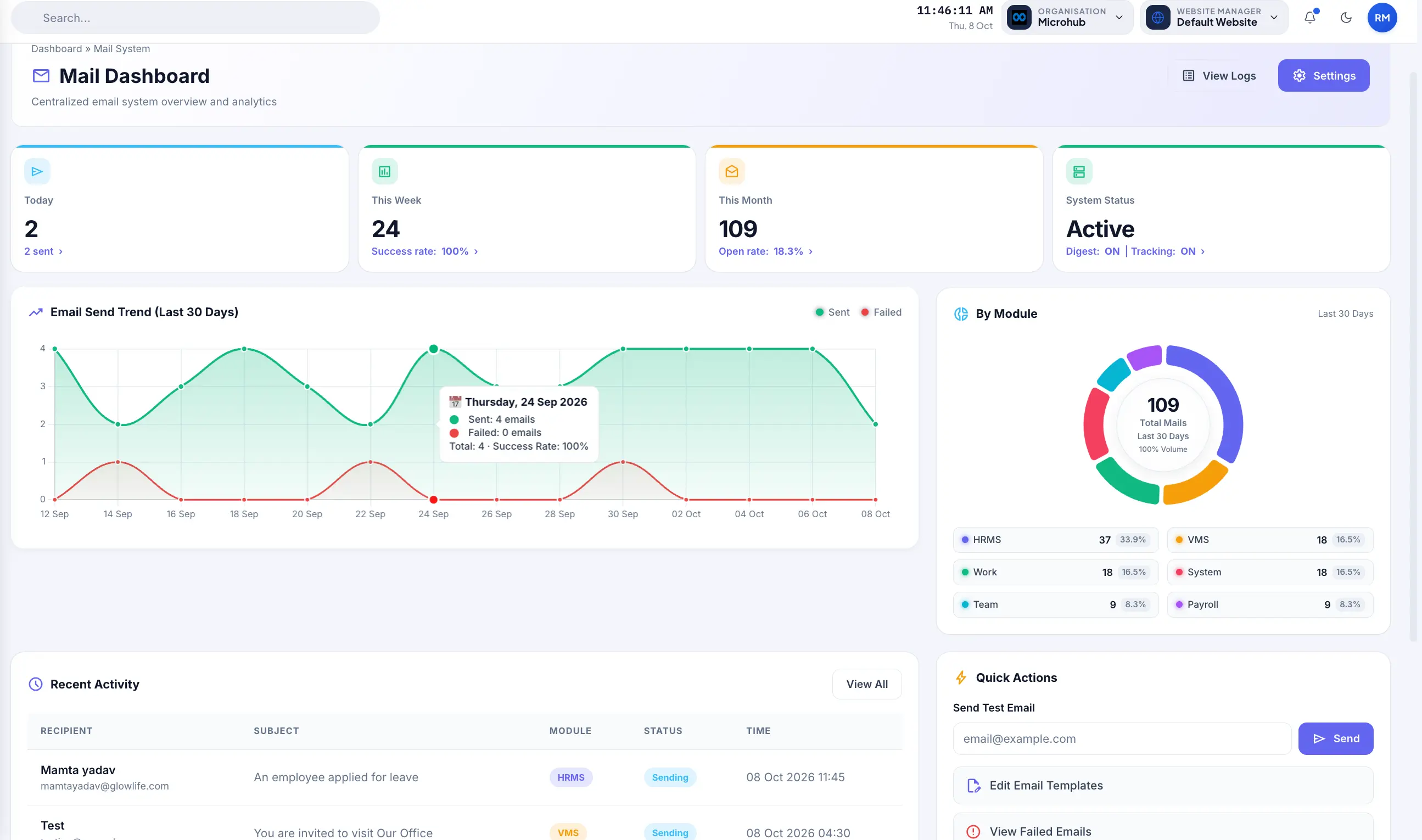
Centralized email system overview and analytics. Summary cards, send trend, by-module chart, recent activity and quick actions.
- Summary metrics: Today / This Week / This Month / System Status cards.
- Trend analysis: Email Send Trend (last 30 days) — Sent vs Failed volume.
- Module distribution: By Module donut chart (HRMS, VMS, Work, System, Team, Payroll).
- Real-time activity: Recent Activity stream with recipient, subject, module, and status.
- Quick actions: Send Test Email, Edit Templates, View Failed, Analytics, and Export Logs.
02 · Email Logs
Email Logs
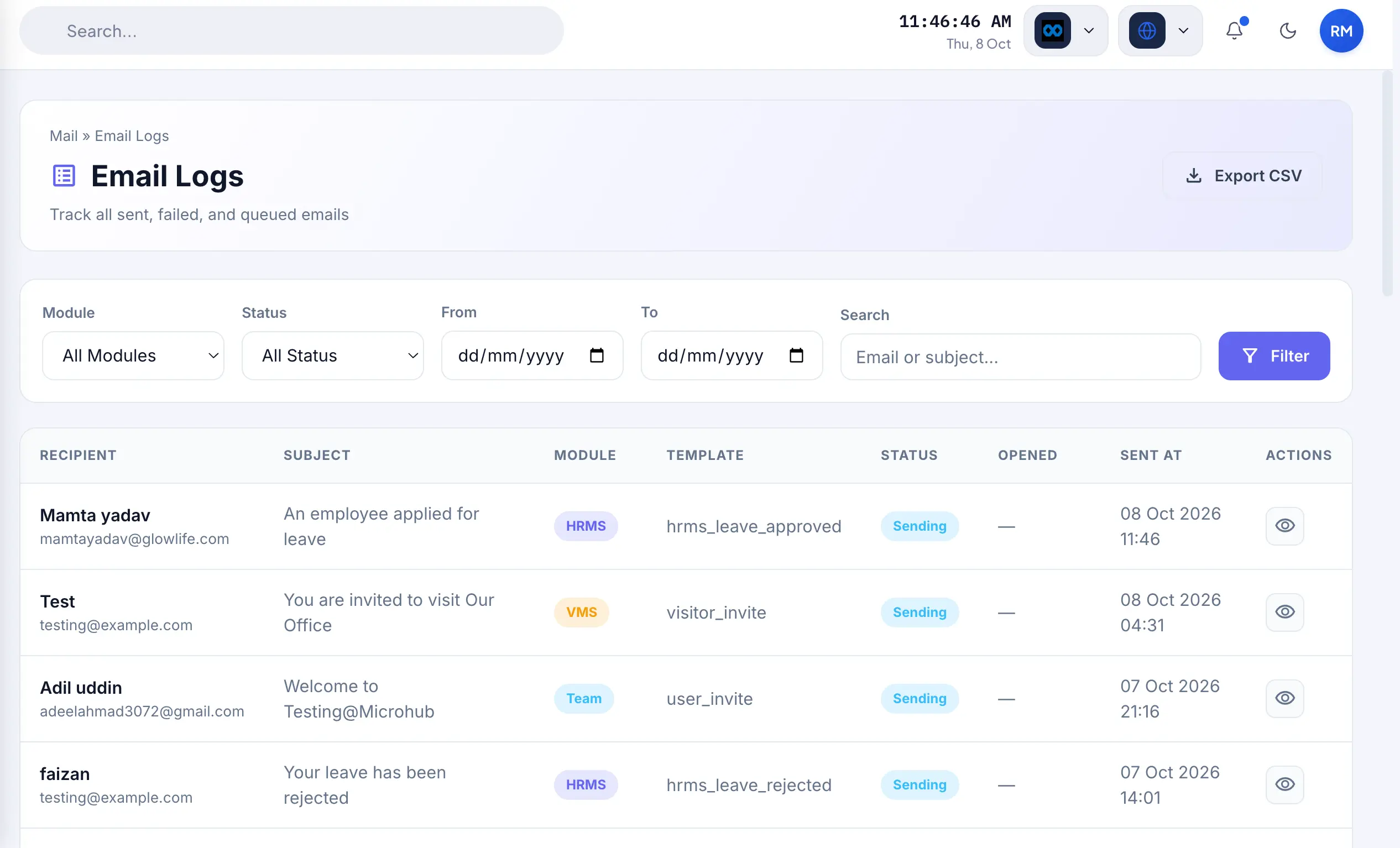
Track all sent, failed and queued emails. Filter by module, status and date range; search by email or subject; export CSV.
- Flexible filters: Filter by Module, Status, From/To dates, and live search.
- Audit table: Recipient, Subject, Module, Template, Status, Opened status, and Sent At time.
- Deep inspection: View action (eye icon) per row to inspect delivery details and payload.
- CSV export: One-click CSV export for offline reporting and compliance analysis.
- Full audit trail: Complete chronological record for troubleshooting and legal compliance.
03 · Templates
Email Templates
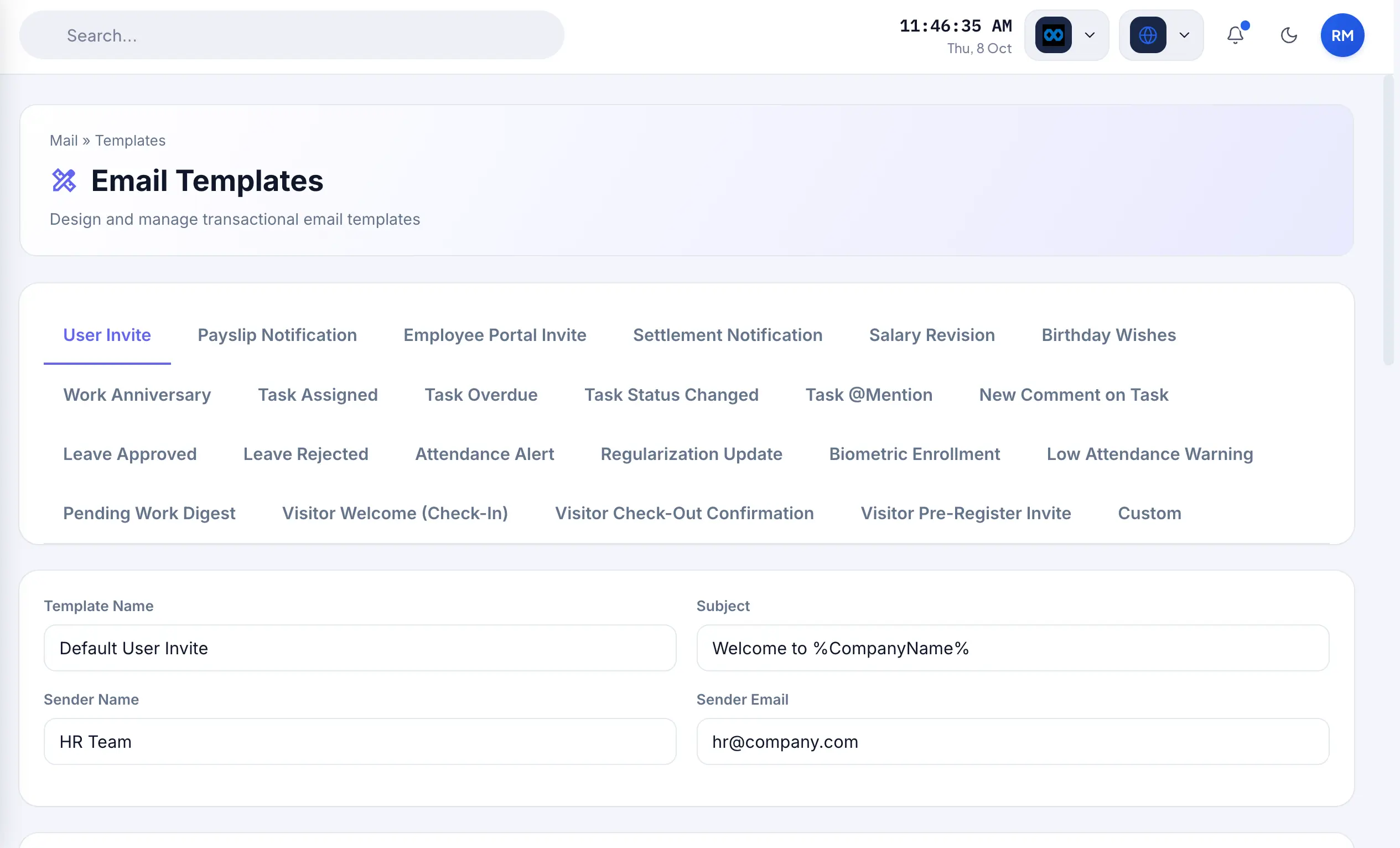
Design and manage transactional email templates. Tabs for every automated email type; placeholders and rich-text content editor.
- Dedicated tabs: User Invite, Payslip, Leave Approved/Rejected, Task Assigned, Biometric Enrollment, and more.
- Sender configuration: Template Name, Subject, Sender Name, and Sender Email.
- Smart placeholders: Insert dynamic fields for Employee, Payroll, Company, Tasks, Leave, and Biometrics.
- Rich-text editor: Visual HTML content editor with Preview and Save controls.
- Consistent branding: Professional, uniform communication without developer dependency.
04 · Analytics
Email Analytics
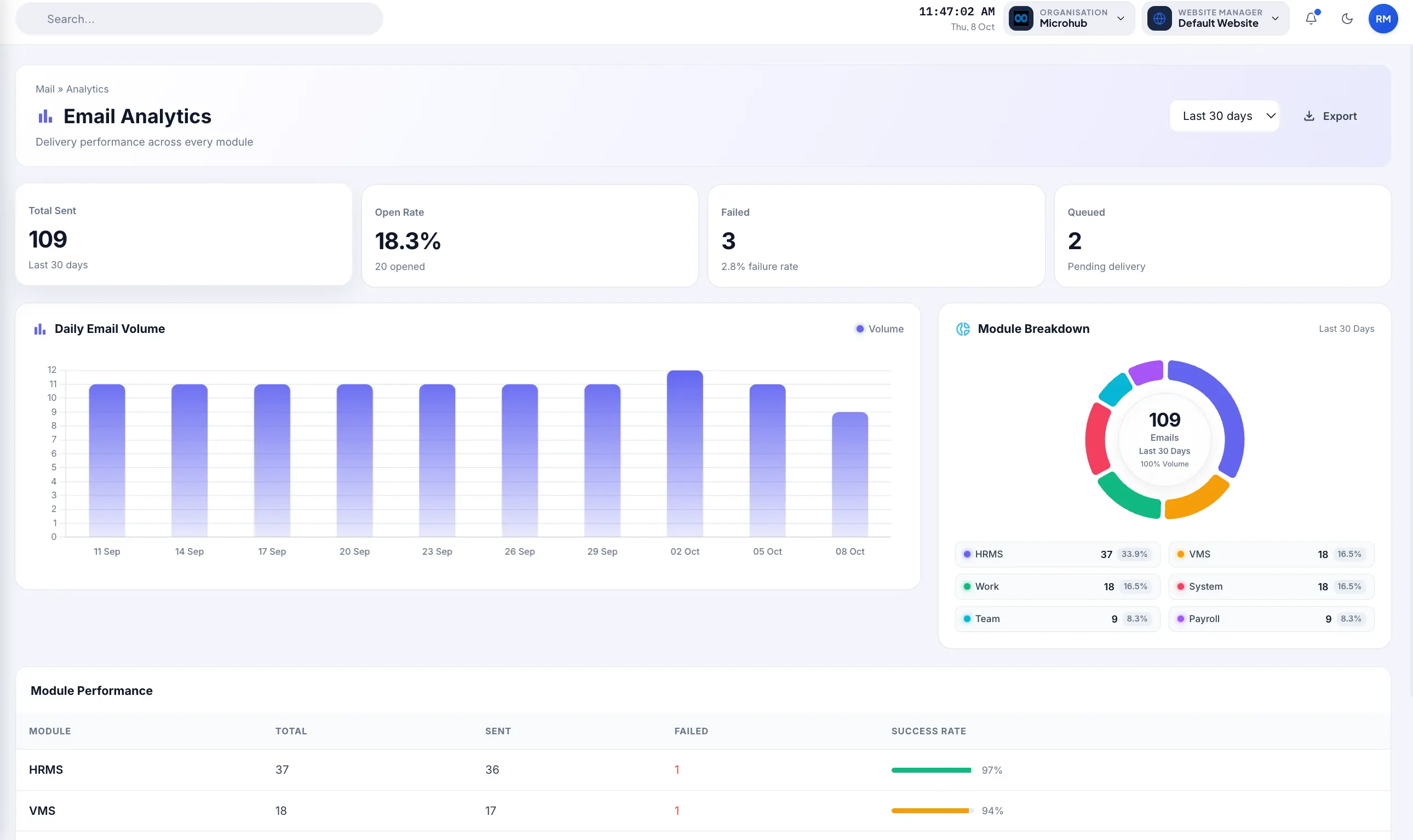
Delivery performance across every module. Total sent, open rate, failed, queued, daily volume and module performance.
- Core KPI cards: Total Sent, Open Rate %, Failed dispatches, and Queued emails.
- Daily volume graph: Visual bar chart illustrating daily outgoing email volume over time.
- Module distribution: Departmental volume share donut chart across all system areas.
- Performance table: Module Performance breakdown with Total, Sent, Failed, and Success Rate %.
- Export controls: Export functionality and date-range controls for management presentations.
05 · Settings
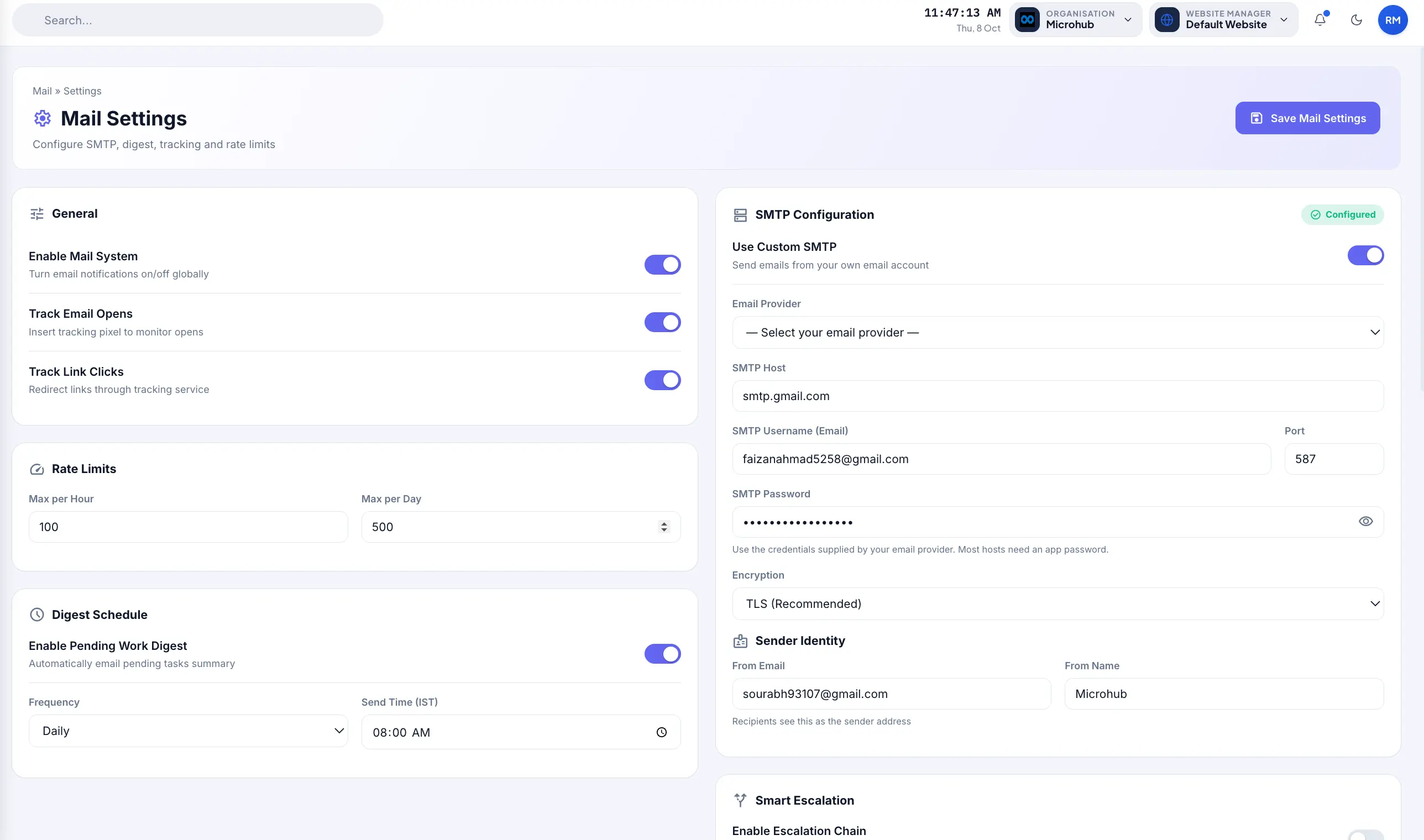
Mail Settings
Configure SMTP, digest, tracking and rate limits. General toggles, rate limits, SMTP configuration, sender identity and digest schedule.
- General toggles: Enable Mail System, Track Email Opens, and Track Link Clicks.
- Rate limits: Configurable Max per Hour and Max per Day to prevent mailbox blacklisting.
- SMTP configuration: Host, Username, Password, Port, and TLS Encryption.
- Sender identity: Set default From Email and recognizable From Name.
- Digest schedule: Pending Work Digest frequency and automatic morning dispatch times.
- Smart escalation: Multi-tiered auto-escalation chain for overdue tasks (Reminder → CC Manager → CC HR).
05 · Settings (continued)
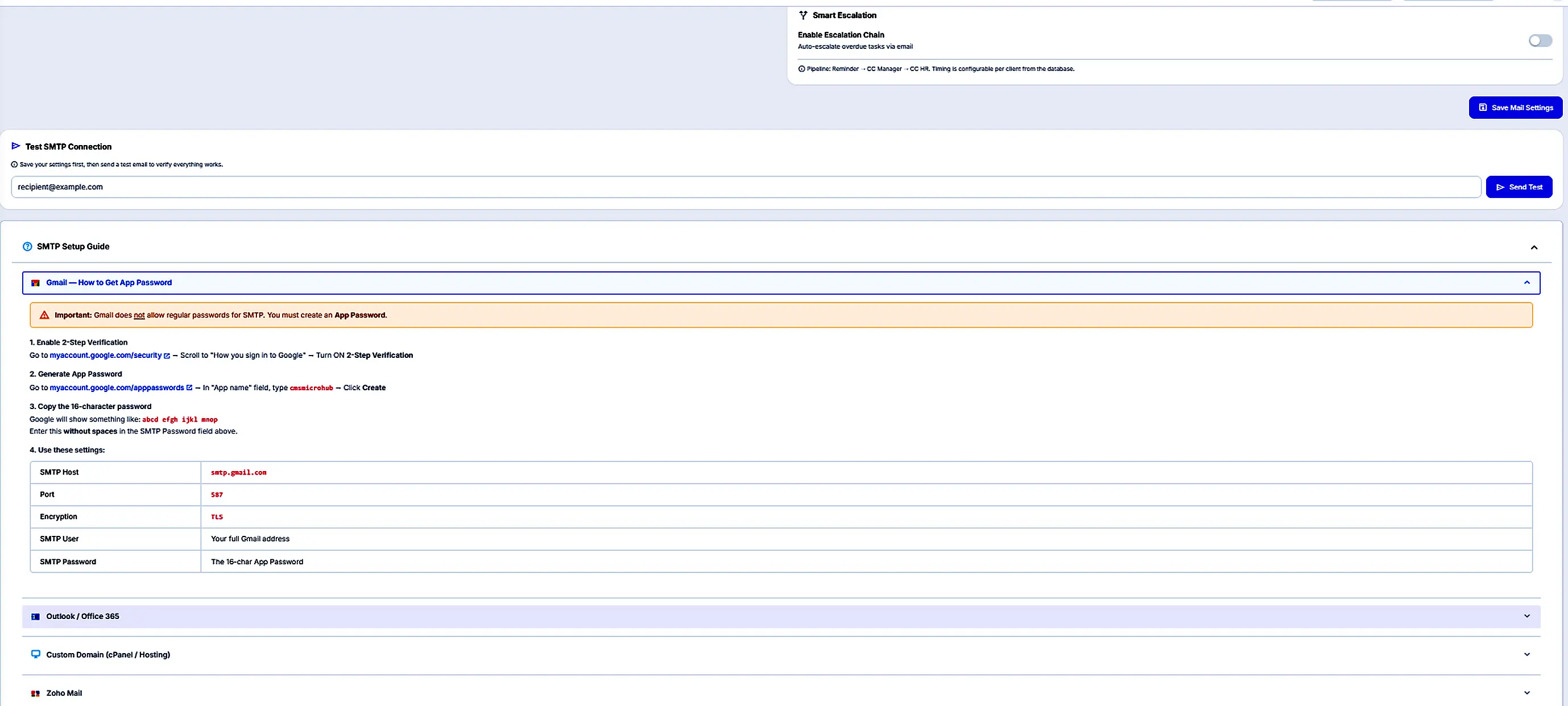
Test SMTP & Setup Guide
Test SMTP Connection after saving settings. Expand the SMTP Setup Guide for Gmail App Password, Outlook/Office 365, custom domain and Zoho Mail instructions.
- Instant validation: Test SMTP Connection — enter recipient email and click Send Test.
- Gmail guide: Google 2-Step Verification and 16-character App Password instructions.
- Recommended setup: Host smtp.gmail.com, Port 587, and TLS Encryption for high deliverability.
- Multi-provider guides: Step-by-step documentation for Outlook, Office 365, Zoho Mail, and Custom Domains.
- Validation rule: Remember to Save Mail Settings before sending a test connection.
How it connects
Unified Mail Architecture. Connected to Every Module.
Every business trigger — employee onboarding, salary slip generation, task updates, or visitor checkout — routes through the central Mail Engine into audit-ready dispatch.
High-Delivery Business Mail Pricing
Reliable SMTP relay, transactional infrastructure, customizable templates and real-time delivery logs.
For startups sending up to 20,000 emails/month.
- Up to 20,000 emails / month
- 1 sending domain
- SPF, DKIM & DMARC guidance
- Dynamic email templates
- Real-time open & click tracking
For businesses sending up to 100,000 emails/month.
- Up to 100,000 emails / month
- Up to 3 sending domains
- Dedicated IP address pool
- Automated digest & escalation triggers
- Bounce & spam suppression shield
- Webhook event delivery
- Priority deliverability support
For high-volume transactional senders.
- Unlimited monthly volume
- Multi-domain sender clusters
- Custom IP warmup assistance
- Dedicated Deliverability Manager
- High-throughput REST API & SDK
- 99.99% infrastructure SLA
* Volume tiers tailored to monthly transactional output. Need high-throughput relays or dedicated IPs? Contact Sales.
Your email operations, unified & audit-ready.
Deploy the Microhub Mail Module for seamless SMTP delivery, automated task digests, branded templates, and complete delivery visibility across your enterprise.