0
Core Identity Modules
From enrollment to health & team management
0%
Facial Match Precision
Anti-spoof liveness & deepfake detection
0
End-to-End Stages
Full audit lifecycle with closed loop monitoring
0s
Live Verification Speed
Near-instant edge & cloud verification checks
Overview

What the Biometric module delivers

A complete facial recognition stack for workforce identity — from employee enrollment to live verification, audit trails and system monitoring.

▦

Dashboard

Live snapshot of enrollment coverage, verification trends, success rate and quick actions.

👤

Employees

Manage the workforce roster and track each employee’s biometric enrollment status.

📷

Face Enrollment

Capture face via camera or upload, apply guidelines and generate a secure template.

✓

Verification

Match live face against enrolled templates with score, liveness and access decision.

📑

Templates

View, quality-score and manage all stored biometric face templates.

📋

Access Logs

Complete audit trail of every verification attempt with score, location and reason.

⚠

Security Alerts

Monitor deepfake detections, liveness failures and failed attempts by location.

♥

System Health

Engine status, response time, service checks and recent diagnostic errors.

👥

Team Management

View all team members, roles, status and member IDs. Search, filter and manage from one list.

➕

Add Team Member

Create a new member with role, department, designation, password and biometric privacy permissions.

Lifecycle

Biometric workflow

End-to-end path from employee roster to live verification, audit and system health. Complete each stage before moving to the next.

01 Roster Stage

Employees & Team — Roster & members

Register employees (Employees module) or add team members (TEAM module) with role and biometric privacy permissions. Confirm who is Active and who still needs biometric enrollment.

02 Capture Stage

Face Enrollment — Capture template

Open Face Enrollment for the employee. Choose Use Camera or Upload Photo, follow Photo Guidelines, Initialize Camera, Capture & Enroll. Wait until the template is created.

03 Storage Stage

Templates — Confirm storage

Check Template Manager: employee moves to Enrolled, confidence and quality scores appear, primary template is set. Dashboard Active Templates count increases.

04 Match Stage

Verification — Match live face

Open Face Verification for the same employee. Optionally set location, Initialize Camera, click Verify Face. Confirm Identity Verified / Access granted with match score and liveness.

05 Audit Stage

Access Logs — Audit trail

Every verification is written to Access Logs: Log ID, timestamp, employee, status (Success/Failed), match score, liveness, deepfake flag, location, processing time and IP.

06 Security Stage

Security Alerts — Monitor failures

Failed or suspicious attempts surface in Security Alerts: critical deepfake detections, liveness failures, failure reasons and failures-by-location. Review recent failed attempts.

07 Loop Closed

System Health & Dashboard — Close the loop

Confirm engine is Operational, services healthy, and Dashboard shows updated Active Templates, success rate and recent activity. Ready for the next physical access or attendance test.

💡
Testing principle:

Complete enrollment and confirm the template in Template Manager before running verification. Then check Access Logs and Security Alerts so the full lifecycle is visible in one demo.

Verified Biometric Pipeline
Employees → Enrollment → Templates → Verification → Access Logs → Security Alerts → System Health
Modules

Biometric module screens

Each screen below matches the live application. Use the screenshots as the visual reference for client demos and testing.

01 • Dashboard

Biometric Dashboard

Live snapshot of enrollment, verification trends and system health. Quick actions for enroll, verify, manage templates and view alerts.

  • ✓ Active Templates & today’s verifications
  • ✓ Success rate (7d) and pending enrollment
  • ✓ Verification trends chart (successful vs failed)
  • ✓ Failure reasons breakdown & system health bars
  • ✓ Recent activity feed with pass/fail status
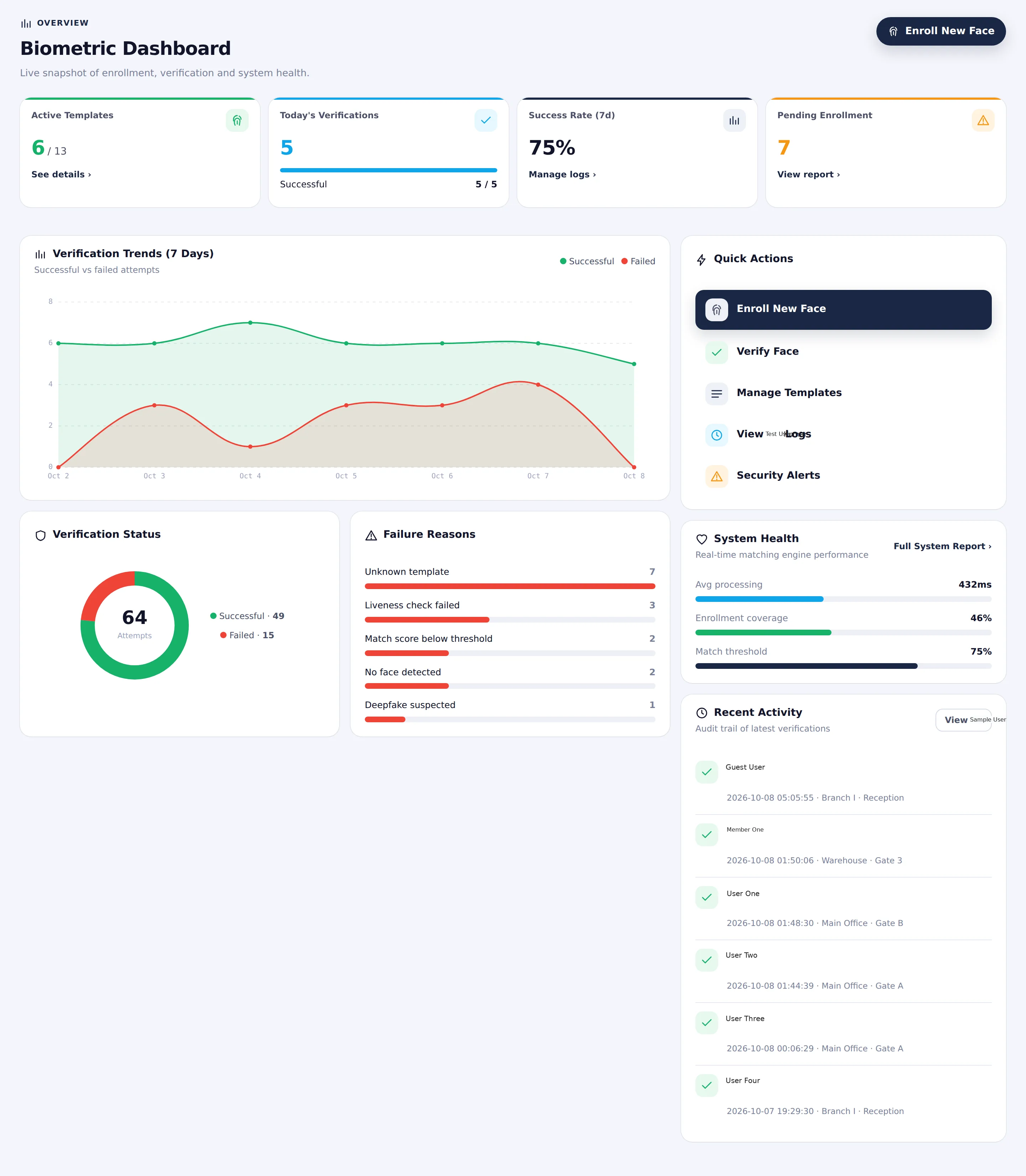
Biometric Dashboard • Live Coverage & Trends
Biometric Dashboard
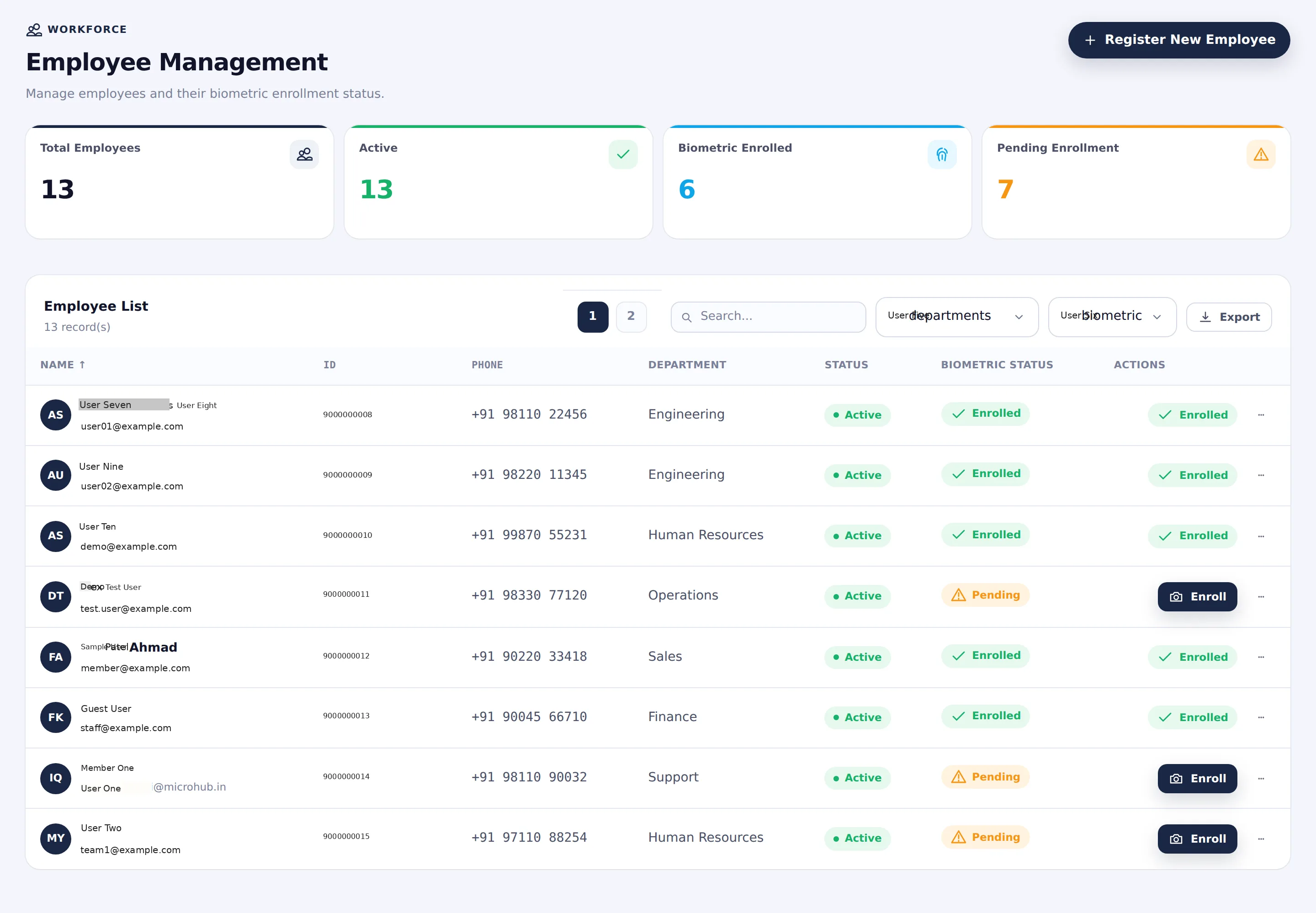
02 • Employees

Employee Management

Manage employees and their biometric enrollment status. Filter by department or biometric state and enroll pending users in one click.

  • ✓ Total / Active / Biometric Enrolled / Pending cards
  • ✓ Employee list with ID, phone, department, status
  • ✓ Biometric status badge (Enrolled / Pending)
  • ✓ Direct Enroll action for pending employees
  • ✓ Search, department filter and export
Employee Management • Biometric Enrollment Status
Employee Management
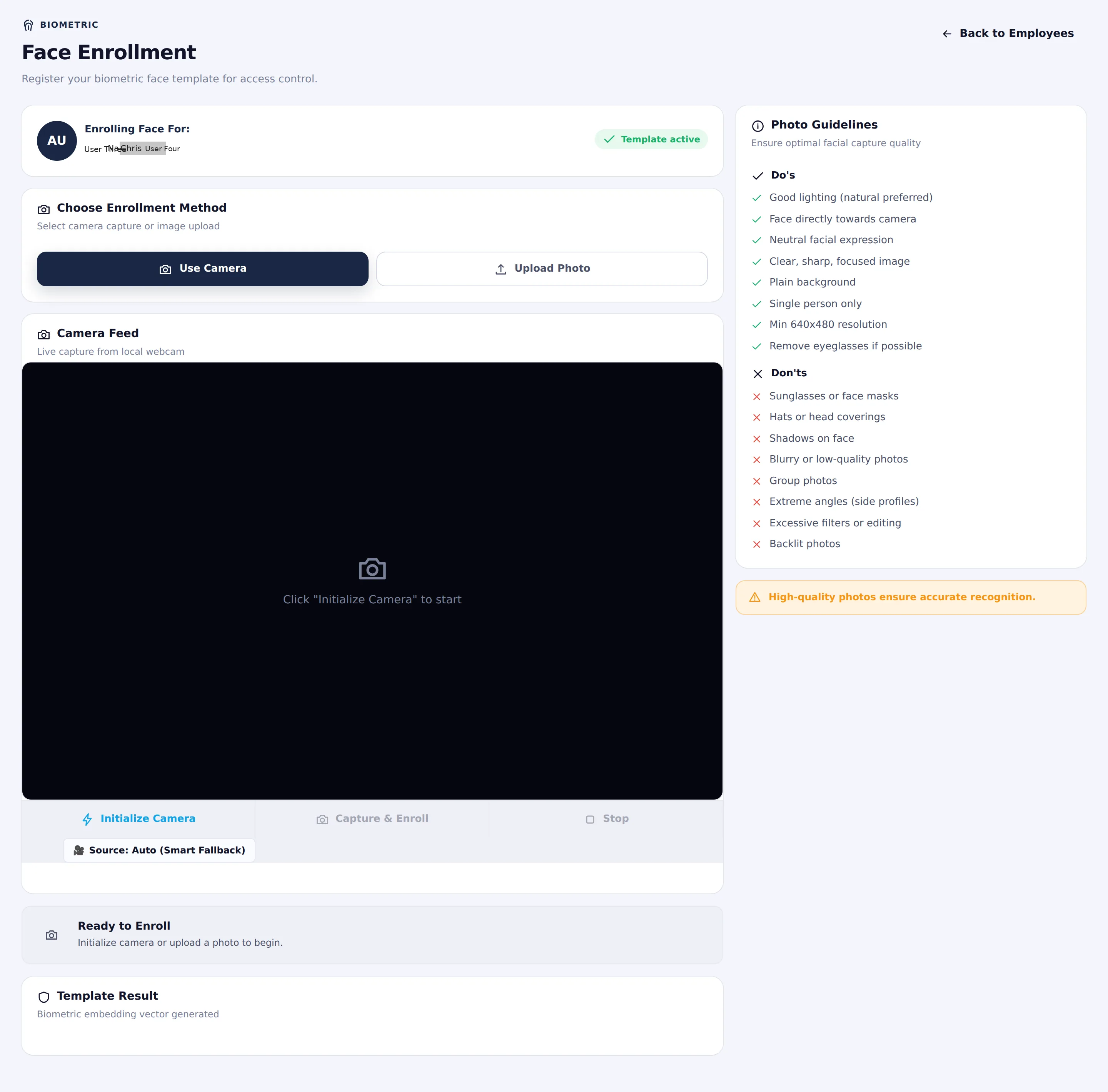
03 • Face Enrollment

Face Enrollment

Register a biometric face template for access control. Choose camera capture or photo upload, follow Do’s / Don’ts guidelines, then initialize camera and capture.

  • ✓ Employee context (Enrolling Face For)
  • ✓ Use Camera or Upload Photo methods
  • ✓ Live camera feed with Initialize / Capture & Enroll
  • ✓ Photo guidelines (Do’s and Don’ts)
  • ✓ Template result status after processing
Face Enrollment • Camera Capture & Template Generation
Face Enrollment
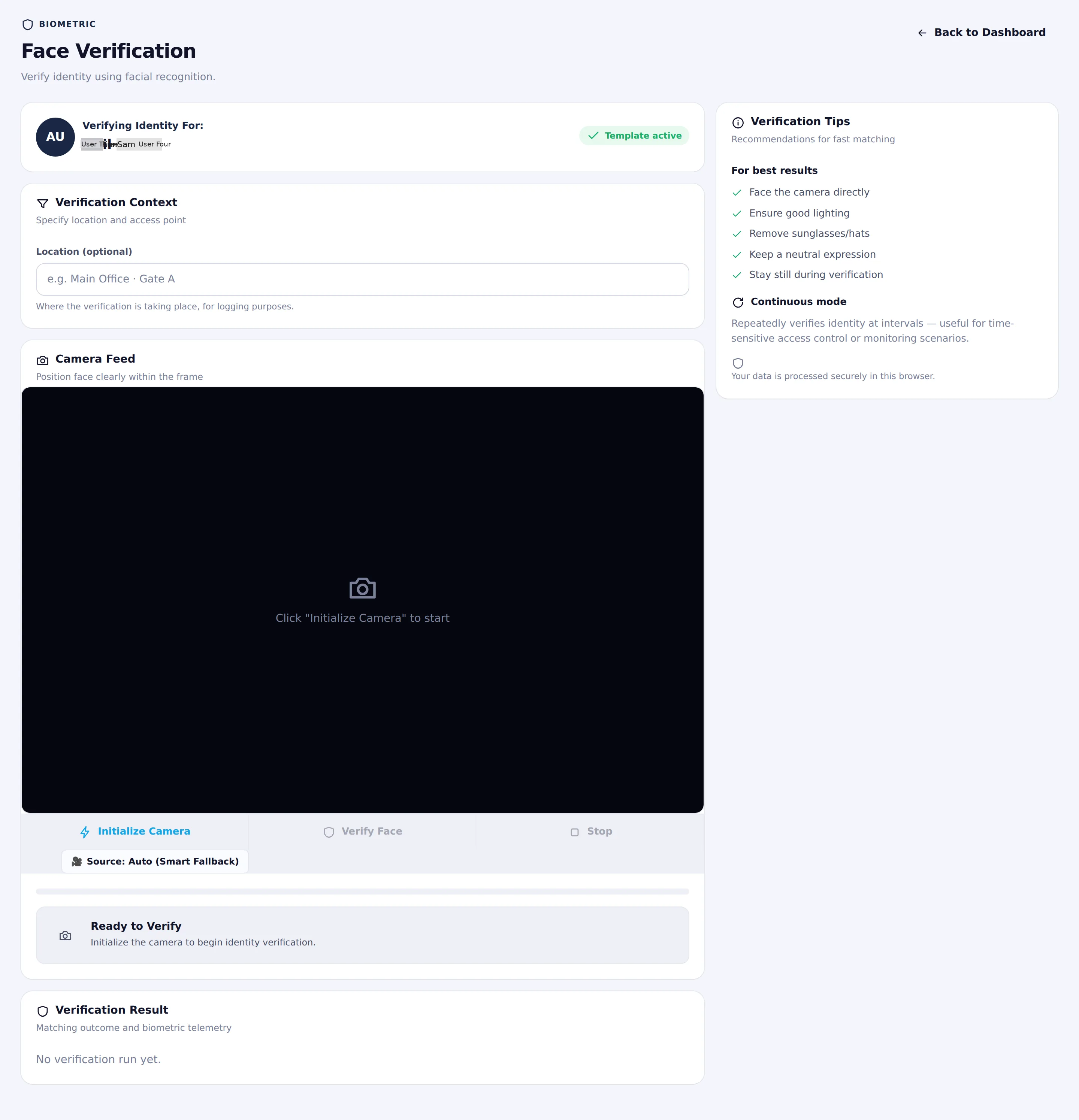
04 • Verification

Face Verification

Verify identity using facial recognition. Set optional location context, initialize camera, then Verify Face. Supports continuous mode for time-sensitive access.

  • ✓ Verifying Identity For (employee context)
  • ✓ Optional location field for logging
  • ✓ Camera feed + Initialize / Verify Face / Stop
  • ✓ Verification tips and continuous mode
  • ✓ Result panel with match score & decision
Face Verification • Live Match & Access Decision
Face Verification
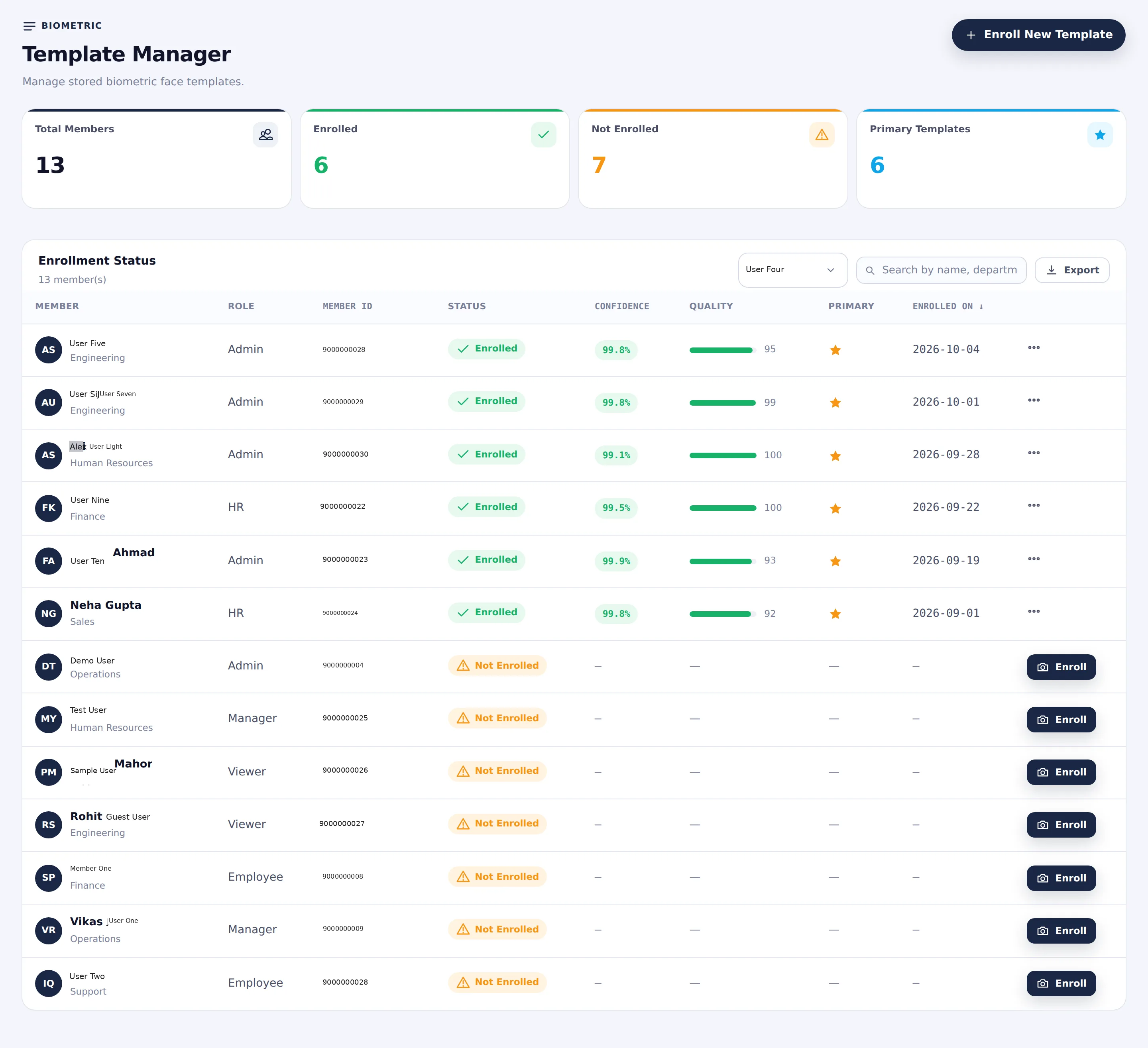
05 • Templates

Template Manager

Manage stored biometric face templates. View enrollment status, confidence, quality score, primary flag and enrollment date. Enroll new templates from here.

  • ✓ Total Members / Enrolled / Not Enrolled / Primary
  • ✓ Enrollment status table with role & member ID
  • ✓ Confidence % and quality score bars
  • ✓ Primary template indicator and enrolled-on date
  • ✓ Enroll action for not-enrolled members
Template Manager • Quality & Confidence Scores
Template Manager
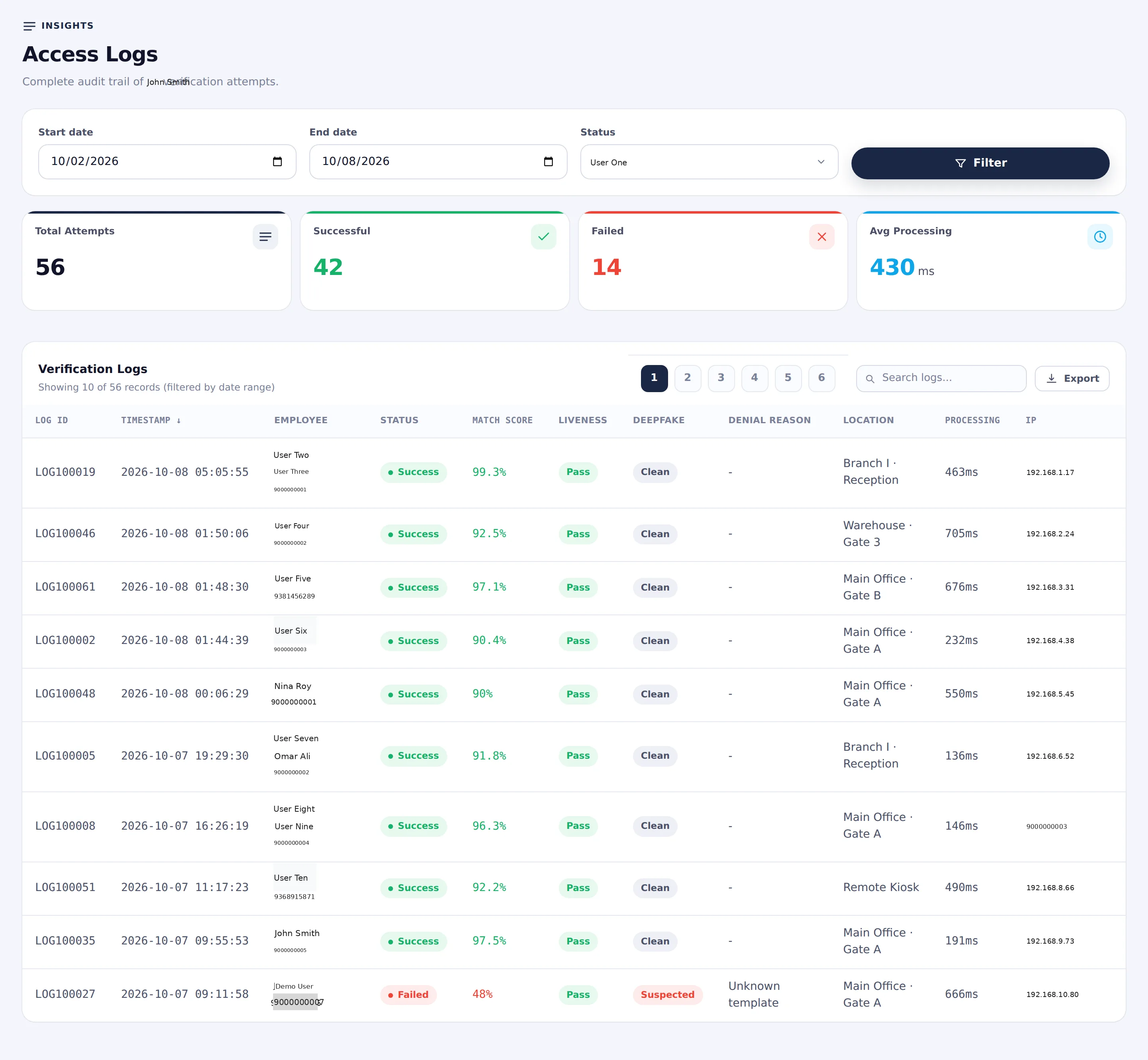
06 • Access Logs

Access Logs

Complete audit trail of all verification attempts. Filter by date range and status. See match score, liveness, deepfake flag, denial reason, location and processing time.

  • ✓ Total / Successful / Failed / Avg Processing cards
  • ✓ Date range and status filters
  • ✓ Log ID, timestamp, employee, status
  • ✓ Match score, liveness, deepfake, denial reason
  • ✓ Location, processing time and IP
Access Logs • Timestamped Audit Records
Access Logs
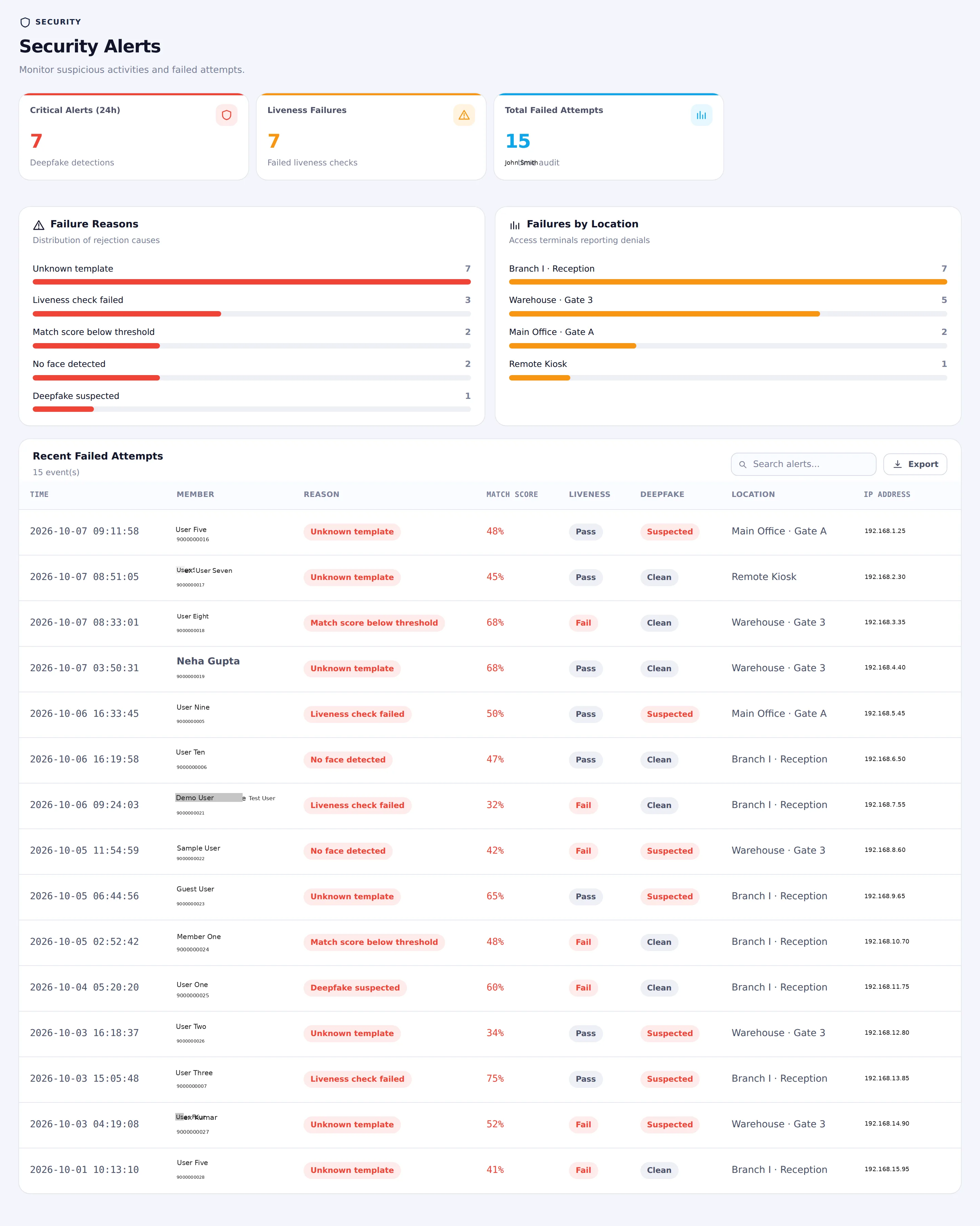
07 • Security Alerts

Security Alerts

Monitor suspicious activities and failed attempts. Critical alerts, liveness failures and total failed attempts at a glance, plus failure reasons and location breakdowns.

  • ✓ Critical Alerts (24h) & deepfake detections
  • ✓ Liveness failures and total failed attempts
  • ✓ Failure reasons distribution bars
  • ✓ Failures by location (terminals / gates)
  • ✓ Recent failed attempts table with scores
Security Alerts • Deepfake & Liveness Monitoring
Security Alerts
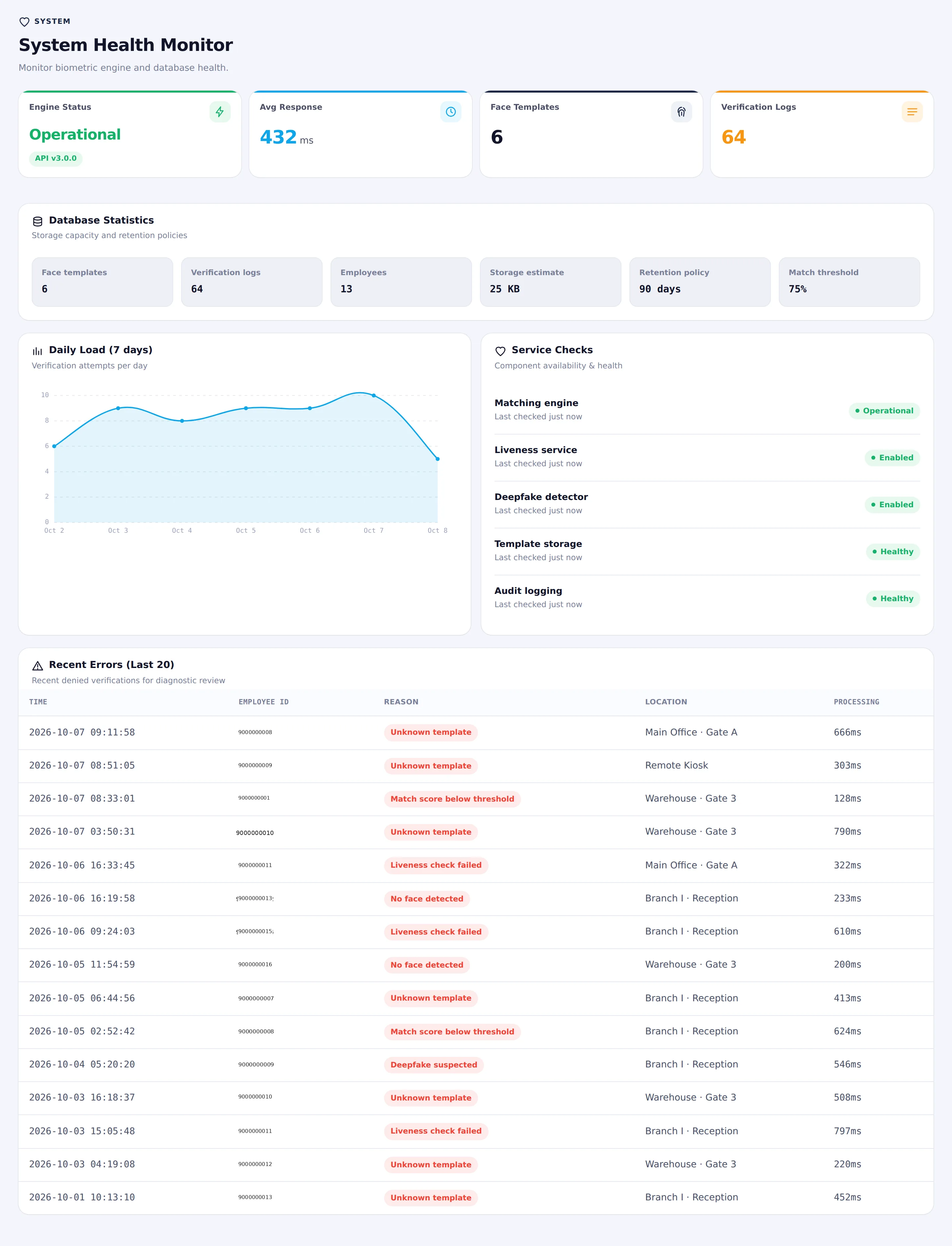
08 • System Health

System Health Monitor

Monitor biometric engine and database health. Engine status, average response, template and log counts, daily load chart, service checks and recent diagnostic errors.

  • ✓ Engine status (Operational) & avg response time
  • ✓ Face templates and verification logs counts
  • ✓ Database statistics (storage, retention, threshold)
  • ✓ Daily load chart (7 days)
  • ✓ Service checks (matching, liveness, deepfake, storage, audit)
  • ✓ Recent errors with reason and processing time
System Health • Engine Status & Diagnostics
System Health Monitor
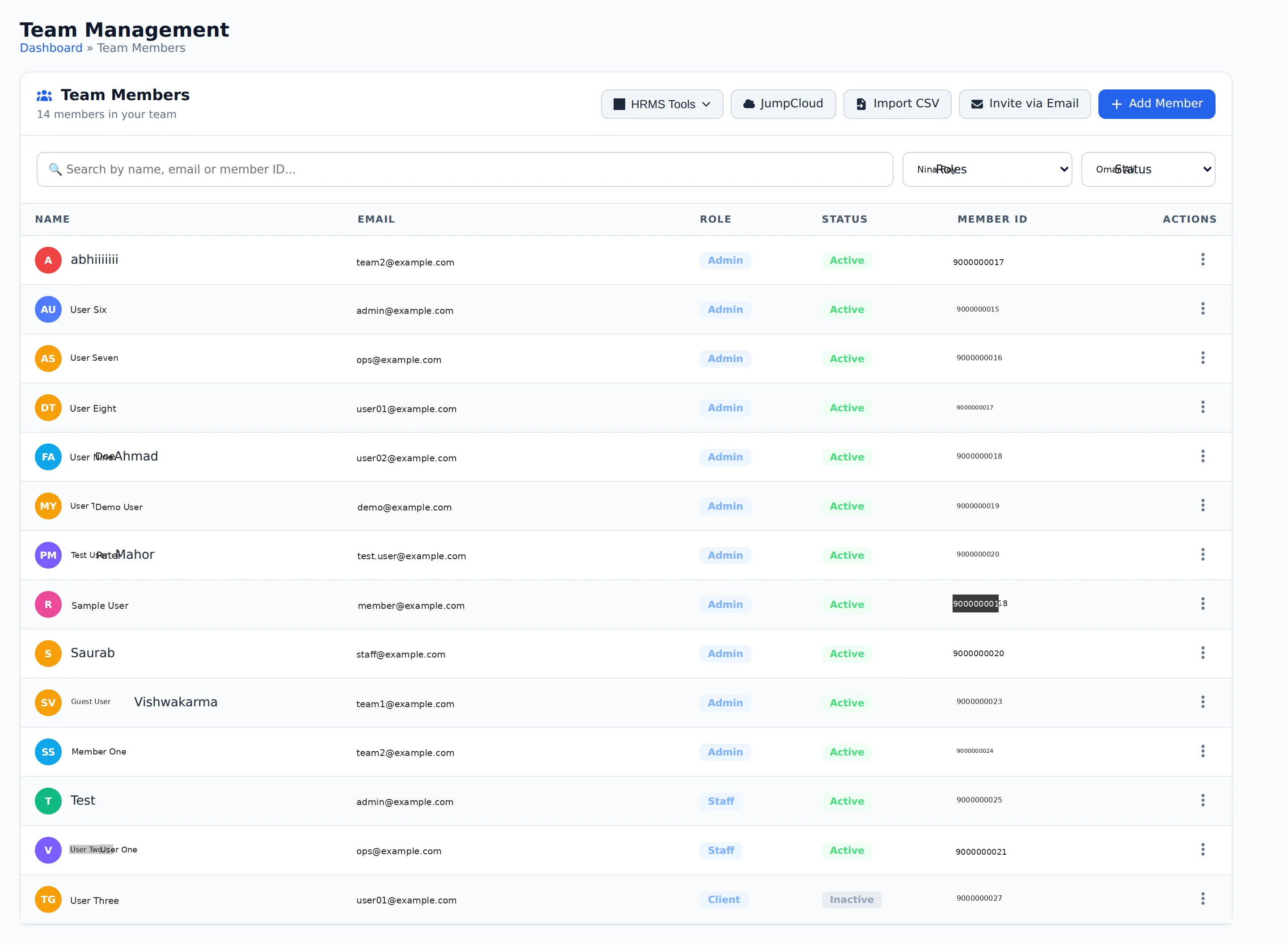
09 • TEAM

Team Management

Central list of all team members. Search by name, email or member ID; filter by role and status. Actions include HRMS Tools, JumpCloud, Import CSV, Invite via Email and Add Member.

  • ✓ Team members table (name, email, role, status, member ID)
  • ✓ Search and filters (All Roles / All Status)
  • ✓ HRMS Tools, JumpCloud, Import CSV, Invite via Email
  • ✓ Quick Add Member entry point
  • ✓ Row actions for each member
Team Management • Members Directory & Roles
Team Management
10 • TEAM

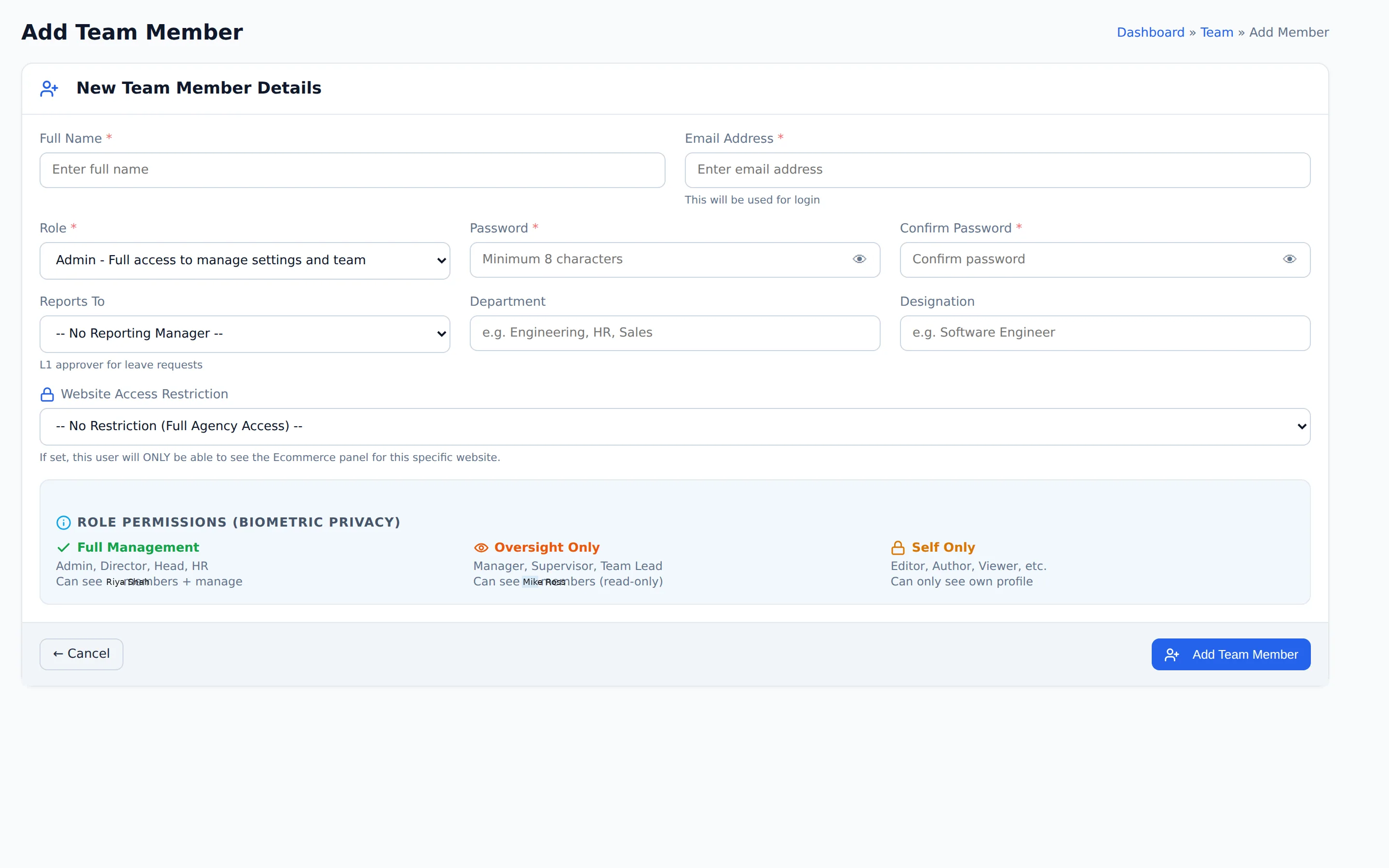
Add Team Member

Create a new team member with full profile and biometric privacy role permissions. Set login credentials, reporting manager, department, designation and website access restriction.

  • ✓ Full Name, Email (login), Password / Confirm Password
  • ✓ Role (Admin and other levels)
  • ✓ Reports To, Department, Designation
  • ✓ Website Access Restriction
  • ✓ Role Permissions (Biometric Privacy): Full Management / Oversight Only / Self Only
  • ✓ Add Team Member action
Add Team Member • Profile & Biometric Privacy
Add Team Member
PRICING

Biometric Identity & Team Pricing

Enterprise face recognition, anti-spoof liveness check and unified workforce team administration.

STARTER
₹149
/ user / month

For companies up to 50 registered team members.

  • Up to 50 registered users
  • AI Face recognition check-in
  • Anti-spoof liveness verification
  • Stored facial template vault
  • Real-time verification logs
ENTERPRISE
Custom
Contact Sales

For large enterprises & manufacturing plants.

  • Unlimited users & devices
  • On-premise biometric edge server
  • Turnstile & flap-barrier SDK
  • Custom ERP / HRMS connectors
  • Dedicated Account Manager
  • 99.99% uptime guarantee & SLA

* Transparent per-user pricing with AI edge models. Need physical biometric terminals or turnstiles? Contact Sales.

START DEPLOYING SECURE BIOMETRICS

Secure your workforce identity with Microhub Biometric.

Deploy frictionless facial verification, auditable access trails, anti-spoof liveness, and unified team management across your branches.