Employee Master
Centralized employee records, personal documents, KYC, organizational hierarchy, grades, and full lifecycle tracking.
A unified operational dashboard providing live workforce status, lateness metrics, automated approvals, and quick actions designed for rapid HR management.
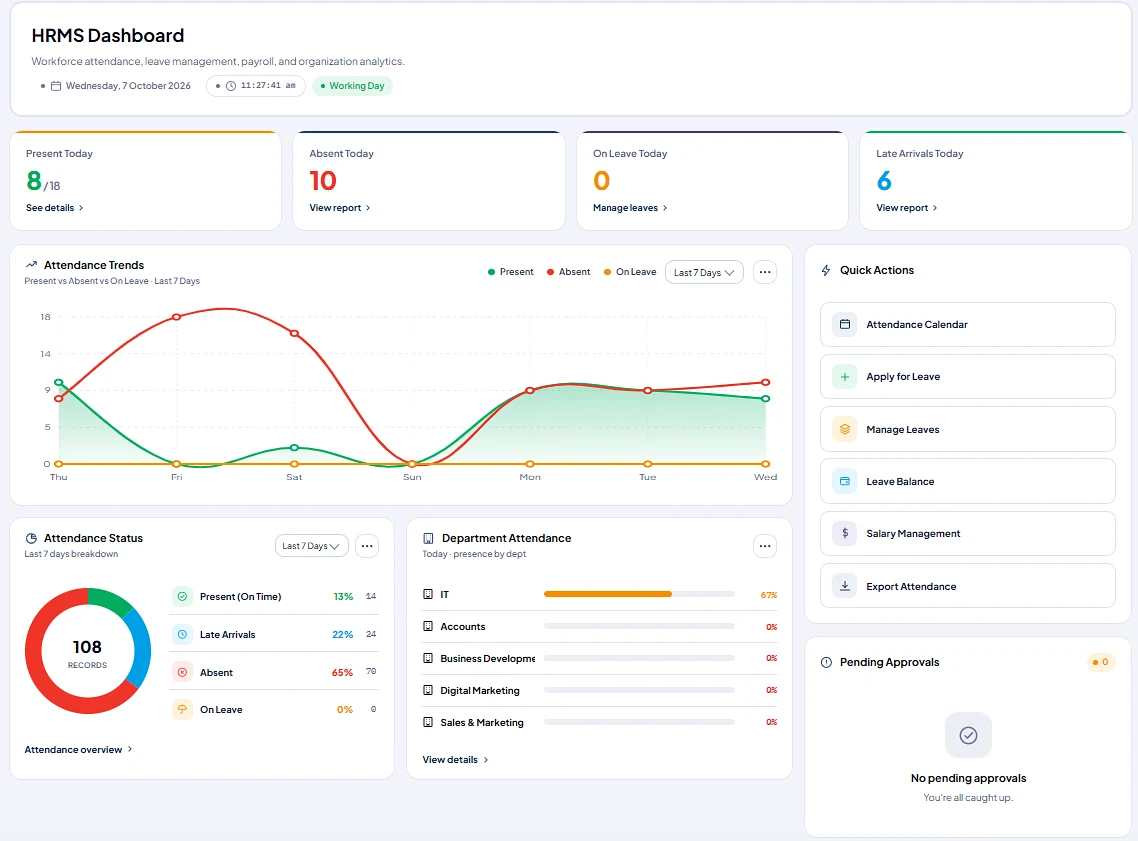
Present, absent, late-arrival, and on-leave tallies update instantly as employees punch in through biometric devices, facial recognition kiosks, or geo-fenced mobile apps.
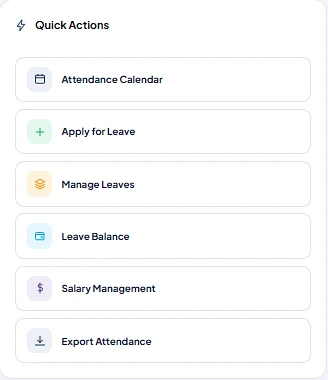
Attendance calendar, leave applications, leave balances, salary management, and data exports are directly accessible from the central dashboard.
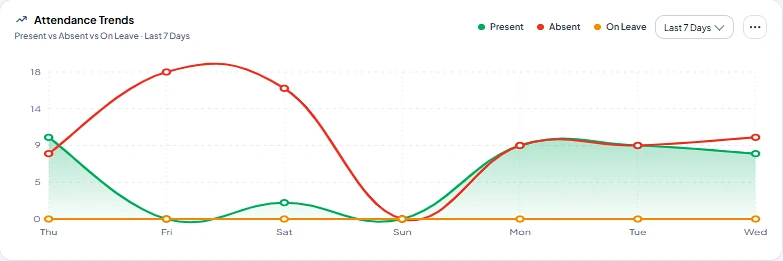
Department attendance distribution and multi-day trend graphs deliver instant visibility to HR directors, department heads, and operational executives.
A complete operational suite covering employee records, multi-modal attendance, leave policies, automated salary computation, and statutory compliance filings.
Centralized employee records, personal documents, KYC, organizational hierarchy, grades, and full lifecycle tracking.
Live sync with face recognition kiosks, USB fingerprint scanners, RFID readers, and geo-fenced mobile check-ins.
Configurable leave policies, multi-tier approval workflows, auto-accruals, and customizable regional holiday calendars.
Rotational shifts, shift allowances, automated night shifts, shift swap requests, and precise working-hour calculations.
Flexible salary templates accommodating basic salary, HRA, special allowances, overtime, arrears, and reimbursements.
One-click monthly payroll processing completed in under 2 minutes, factoring in attendance, leave balances, and deductions.
Automated calculations and ready returns for EPF, ESI, Professional Tax (PT), Labour Welfare Fund (LWF), and TDS.
Digitally signed, encrypted payslips distributed automatically via email and employee self-service portal alongside Form 16.
Pre-built reports covering attendance summaries, leave utilization, overtime expenditure, late arrivals, and department CTC.
Self-service portal for employees to review attendance, apply for leave, submit reimbursement claims, and download tax sheets.
Granular, permission-controlled interfaces for Administrators, HR Officers, Department Managers, Employees, and Finance.
Streamlined employee separation workflows, asset clearance checklists, notice period tracking, and automated full & final settlement.
A structured 10-stage operating lifecycle mapping continuous attendance capture directly into verified payroll runs.
Create centralized records with personal data, identity documents, bank accounts, and compliance credentials.
Map reporting hierarchies, job grades, department allocations, and working branch locations.
Define salary components, CTC breakup, fixed and variable allowances, and statutory deduction parameters.
Capture daily check-in and check-out via facial recognition kiosks, biometric sensors, RFID, or geo-fenced mobile apps.
Employees request time off; managers approve or reject requests; approved leave balances sync to attendance records.
The system aggregates present days, paid leaves, late arrival penalties, and overtime hours into the monthly register.
Compute gross pay, statutory withholdings (EPF, ESI, PT, TDS, LWF), loan deductions, and net salary in a single pass.
Verify variance reports against previous cycles, resolve regularizations, and approve final salary registers.
Produce digital payslips for employees and generate direct bank transfer advice files in NEFT/RTGS standard formats.
Export ready ECR files for EPF, monthly ESI returns, Professional Tax schedules, and management cost analytics.
Microhub records daily presence, timestamps, and lateness penalties, feeding verified attendance metrics directly into the monthly payroll engine.
Real-time attendance logs displaying check-in timestamps, shift matching, lateness minutes, and department summaries in one actionable view.
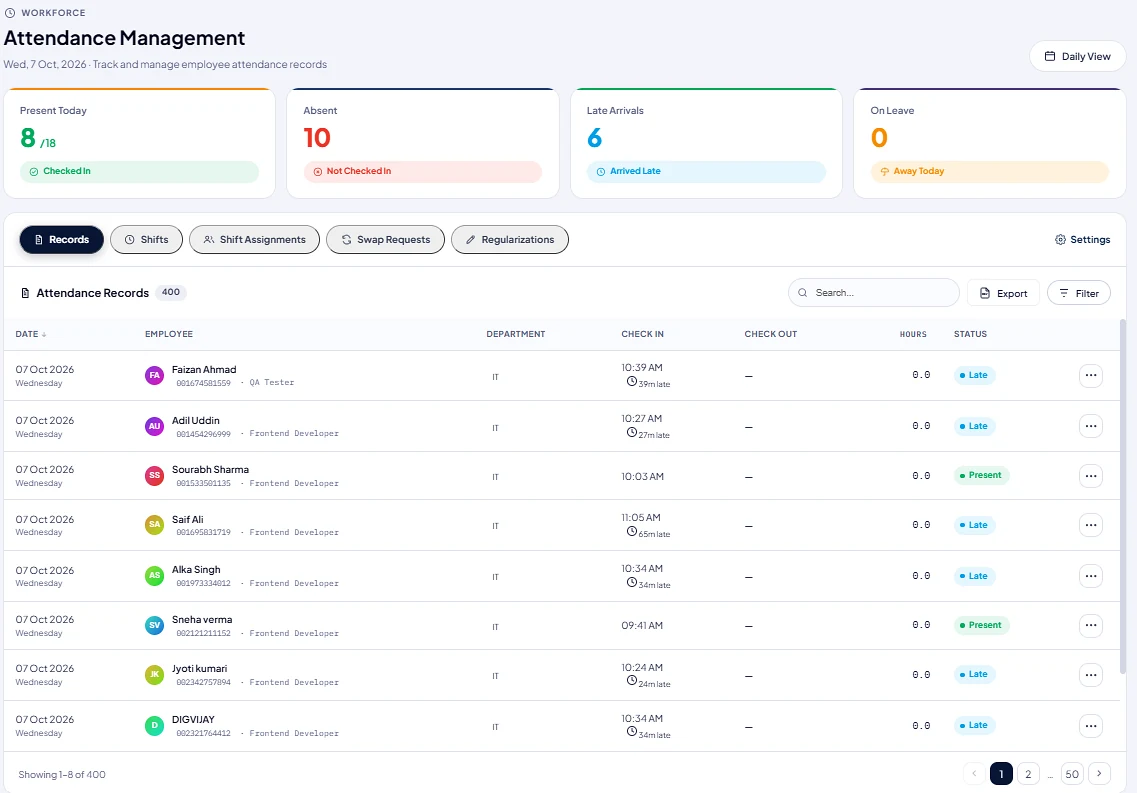 Daily Attendance Records
Support multiple secure check-in modes with strict anti-fraud policy enforcement configured from one central settings panel.
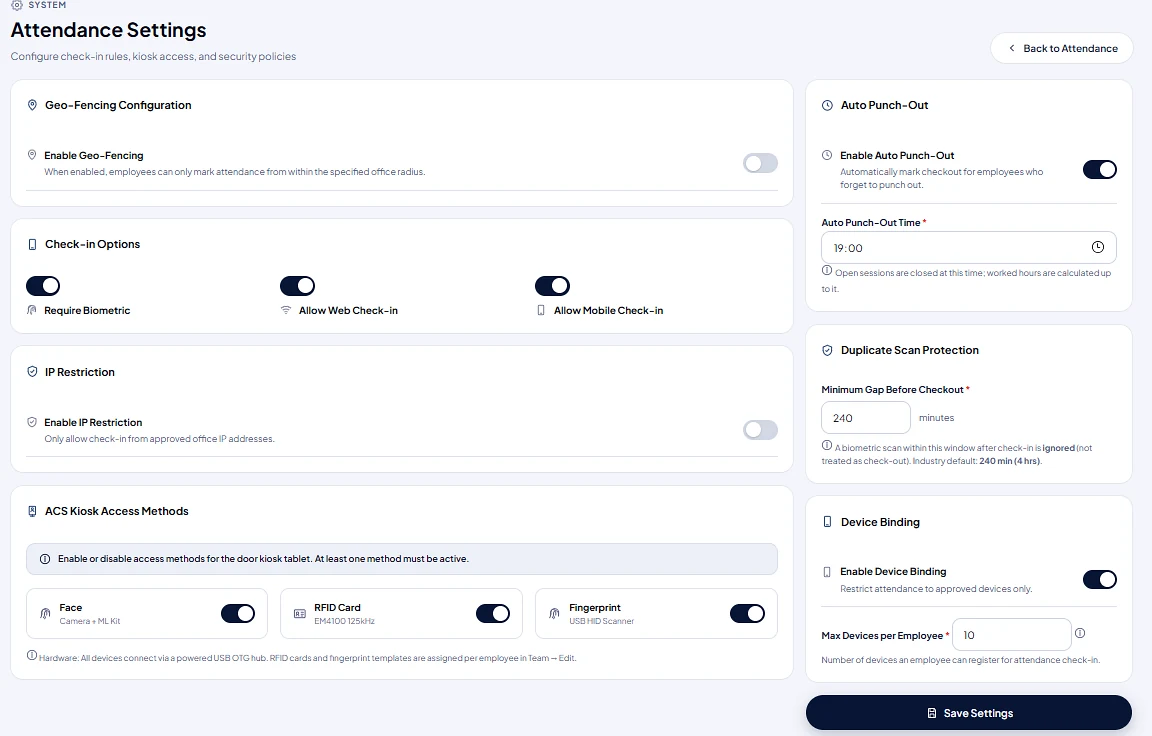 Attendance Policy Settings
Every operational rule can be customized, toggled, and audited to guarantee attendance authenticity.
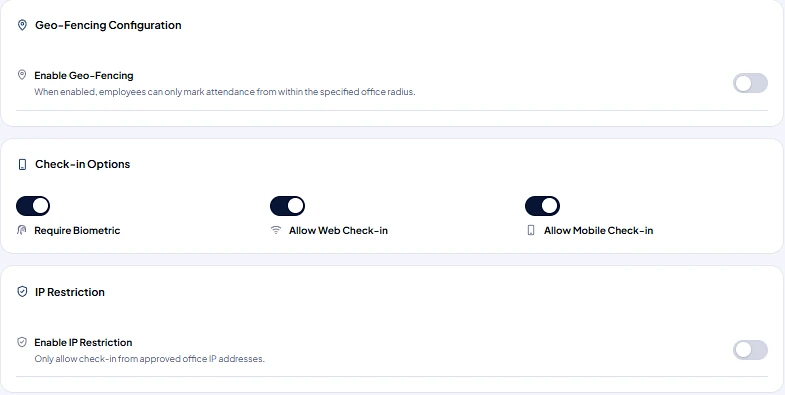
Restrict attendance punches to authorized office perimeters and company network IP addresses to eliminate off-site fraud.
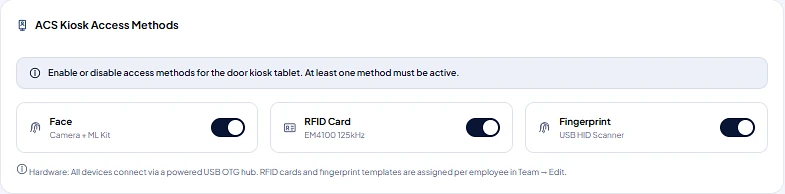
Turn Face recognition (ML Kit), RFID cards (125 kHz), and Fingerprint verification on or off for tablet door kiosks.
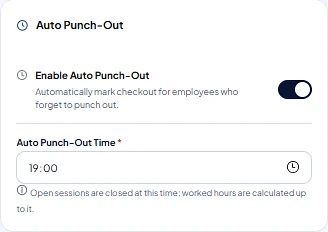
Automatically closes open attendance sessions at preset hours (e.g. 19:00) so forgotten check-outs calculate accurately.
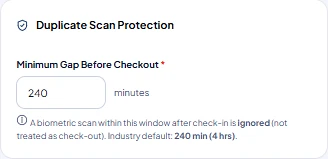
Enforce a minimum gap (e.g. 240 minutes) before a re-scan is accepted, preventing accidental double punches.
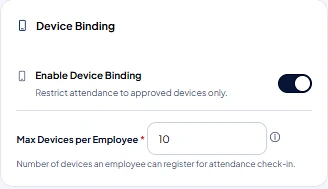
Limit employee check-ins strictly to approved, registered hardware devices to prevent buddy punching.
From application to approval, leaves update employee attendance registers in real-time, calculating paid vs unpaid days without manual calculations.
Configurable salary templates supporting earnings, statutory contributions, arrears, reimbursements, and automated tax calculations for Indian enterprises.
Computed directly from attendance records, active leave approvals, and employee salary master templates.
Operational data visualized through interactive charts and instant exportable compliance and audit registers.
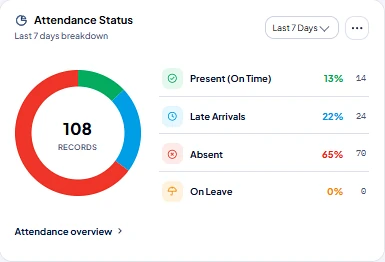
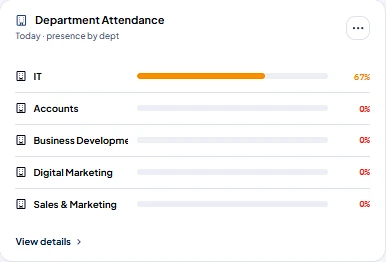

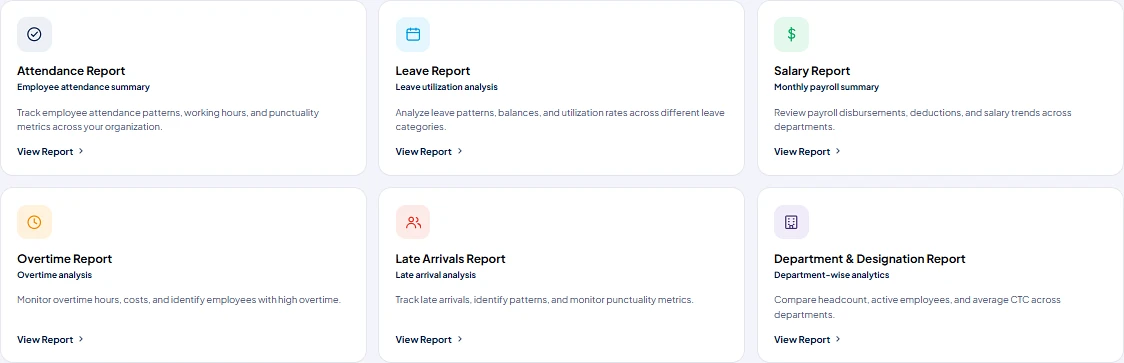
Complete logs of check-ins, lateness, work hours, and punch origins with multi-filter exports.
Tracks category-wise leave consumption, remaining balances, and trends across departments.
Detailed breakdown of gross earnings, statutory deductions, net payouts, and variance tracking.
Identifies high-overtime projects and punctuality patterns to optimize shifts and rosters.
Ensure sensitive compensation and payroll data is only accessible to authorized personnel while giving employees seamless self-service access.
| Role | Operational Responsibilities | Accessible Modules |
|---|---|---|
| Admin | Organization policies, shift setup, biometric device binding, IP whitelisting, and role management. | Attendance Settings, Kiosk Control, System Configuration |
| HR Manager | Employee onboarding, document validation, attendance regularizations, leave policies, and reports. | HRMS Dashboard, Employee Master, Attendance, Leave, Reports |
| Department Head | Team attendance monitoring, overtime approvals, leave requests, and roster scheduling. | Team Dashboard, Leave Approvals, Shift Assignments |
| Employee | Check-in / check-out, leave application, balance checking, digital payslip download, and tax sheets. | Employee Self-Service (ESS), Personal Attendance & Leave |
| Payroll / Finance | Salary structure maintenance, one-click payroll runs, bank advice export, EPF/ESI challans, and Form 16. | Salary Management, Payroll Processing, Banking, Tax & Audit |
A simple step-by-step onboarding pathway designed for swift rollout without business disruption.
Open HRMS → Attendance Management, choose Daily View, filter by department, and review punctuality.
Enable check-in options (Biometric/Web/Mobile), select Kiosk modes (Face/RFID), set auto punch-out, and save.
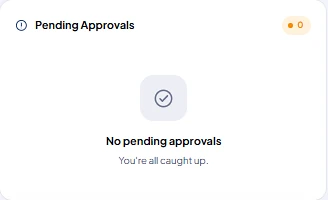
Access Leave Quick Actions from the dashboard, review team requests in Pending Approvals, and take action.
Select HRMS Reports, choose from Attendance, Leave, Salary or Overtime cards, and download verified data.
Achieve higher workforce productivity, zero payroll disputes, and complete regulatory compliance from day one.
Salary calculations that used to take days are executed automatically in minutes with full accuracy.
Facial recognition liveness verification and device binding guarantee attendance integrity.
Auto-generated challans and return sheets for EPF, ESI, PT, and TDS prevent penalties.
Employees access payslips, leave balances, and tax reports directly from mobile or web.
Seamlessly integrate your HR and payroll platform with IT infrastructure, networking, cloud systems, and ERP solutions.
Fixed transparent plans for your organization. All tiers include Web & Mobile App access, VMS, Teams, and third-party APIs like Maps.
Free forever for organizations up to 3 members.
For growing businesses up to 10 employees.
For established teams up to 50 employees.
Annual license for teams up to 50 employees.
* Transparent pricing for your organization. Need more than 50 employees or custom enterprise deployment? Contact Sales.
Yes. Microhub supports industry-standard fingerprint sensors, facial recognition terminals (including AI liveness tablets), and RFID card readers. We provide ready API connectors and powered USB OTG hardware integrations.
Microhub HRMS is built specifically for Indian corporate regulations. The software automatically applies the current calculation rules and wage ceilings for EPF, ESI, state-specific Professional Tax (PT), Labour Welfare Fund (LWF), and TDS. ECR upload files and return reports are generated with a single click.
The system enforces Duplicate Scan Protection (with a configurable minimum gap, such as 240 minutes) to prevent accidental double-taps. Anti-proxy mechanisms include facial recognition with AI liveness detection, geo-fenced mobile check-in radii, and registered Device Binding per employee.
Yes. Employees have access to a responsive self-service portal (ESS) where they can mark attendance (if mobile punch is enabled), submit leave applications, view leave balances, review attendance history, and securely download digitally signed payslips and Form 16.
For most mid-sized organizations, setup and onboarding can be completed in just a few days. We offer bulk Excel import tools for employee masters and opening leave balances, guided department setups, and hands-on administrative training.
You can schedule a personalized walkthrough with our technical team by clicking "Book Technical Review" or contacting our enterprise desk at +91 92208 07363 or info@microhub.in.
Automate attendance capture, eliminate manual calculation errors, and disburse verified payroll with complete statutory compliance.